Deploy Current Loaded Model
Deployment
If you want to deploy the currently loaded model to a new database, or overwrite an existing database with the model changes (for example when loading from a Model.bim file), use the Deployment Wizard under "Model" > "Deploy...".
Tabular Editor comes with a deployment wizard that provides a few benefits compared to deploying from SSDT - especially when deploying to an existing database. After choosing a server and a database to deploy to, you have the following options for the deployment at hand:
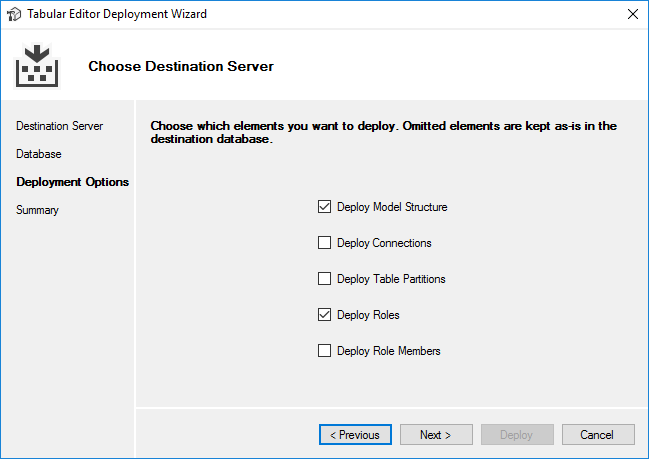
Leaving the "Deploy Connections" box unchecked, will make sure that all the data sources on the target database stay untouched. You will get an error if your model contains one or more tables with a data source, that does not already exist in the target database.
Similarly, leaving out "Deploy Table Partitions", will make sure that existing partitions on your tables are not changed, leaving the data in the partitions intact.
When the "Deploy Roles" box is checked, the roles in the target database will be updated to reflect what you have in the loaded model, however if the "Deploy Role Members" is unchecked, the members of each role will be unchanged in the target database.