Tabular Editor 3 BETA-17.4
Important
A newer version of Tabular Editor is available. You can find the latest version here.
- Download Tabular Editor 3 BETA-17.4
- Download Tabular Editor 3 BETA-17.4 (64 bit)
Updates in BETA-17.4:
- Fix issue with DAX semantic analyzer reporting false circular dependencies in some situations.
- DAX editors now shows keyboard shortcuts in right-click context menu
- Peek Definition editor can now be closed by pressing ESC while the cursor is inside the Peek Definition editor. Also, AutoComplete/Calltips should no longer show up within the editor, since it is read-only by design.
- Allow specifying an AlternateOf BaseColumn property when using the "Count" summarization.
- Improved support for connection strings that point to Power BI service dataset.
Updates in BETA-17.3:
- Tables can now be dragged into the Diagram View (see #15)
- Inline/Define measures in DAX script mode now work as expected (see #91)
- VertiPaq Analyzer should now correctly pick up data model changes made outside of Tabular Editor when collecting statistics
- VertiPaq Analyzer data can now be accessed through scripts (see #90): There's a new global script method,
CollectVertiPaqAnalyzerStats();, as well as two new extension methods for Tables and Columns:.GetCardinality()and.GetTotalSize(). - Multiple improvements to the AutoComplete feature. For example, when typing code between square brackets (see #92)
- Circular dependencies between query-scoped objects in a DAX query or scripted objects in a DAX script, should no longer cause a crash
- Added a new DAX Auto Formatting option to control whether extension columns are always qualified, even when the table name is blank, such as
''[MyExtColumn]. - Fixed a crash that would sometimes occur when double-clicking an item in the Messages View
- Fixed error messages for the ISSELECTEDMEASURE, SELECTEDMEASURE, SELECTEDMEASURENAME and SELECTEDMEASUREFORMATSTRING functions, when used outside of a calculation item or measure expression.
Updates in BETA-17.2:
- Fixed an issue with VertiPaq Analyzer assembly versions.
- Added "Partitions" pane to VeritPaq Analyzer.
- Installer will no longer delete the
%LocalAppData%\TabularEditor3folder contents, allowing users to persist settings through upgrades/uninstalls. - Support for drag/drop of objects into DAX and C# editors (#15).
- Support for drag/drop of selected text in all code editors. Hold down CTLR while dragging to copy the selection.
- Support for the new OneWay_LeftFiltersRight and OneWay_RightFiltersLeft arguments in the DAX CROSSFILTER function.
- Upgraded TOM to 19.20.1.
- Various stability improvements.
Updates in BETA-17.1:
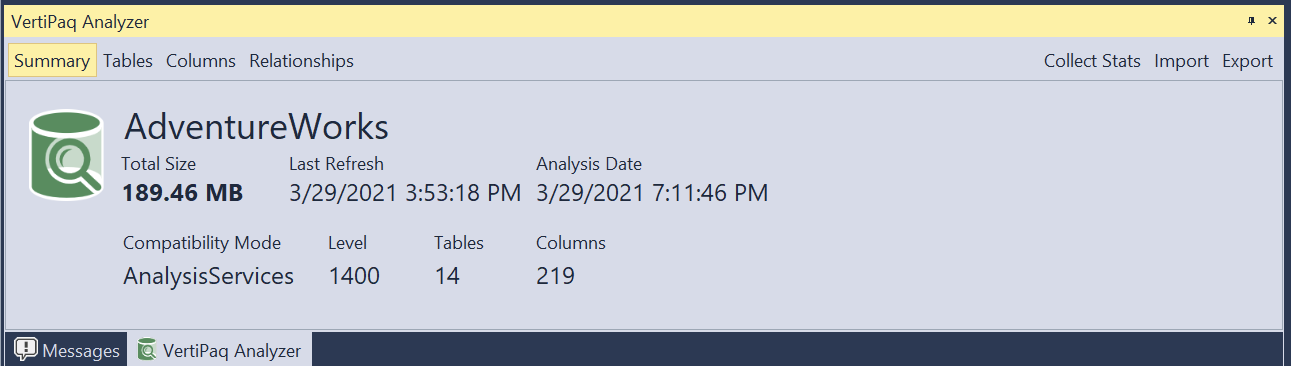
- Added VertiPaq Analyzer (you may need to delete the Layout.gz file under %LocalAppData%\TabularEditor3 and/or reset to the Default window workspace if the new view doesn't appear in the UI)
- Collects statistics (column and table cardinalities and sizes) which will then show up in the TOM Explorer tooltips as well as when hovering over a column or table reference in any DAX editor.
- Import/Export statistics from/to VPAX files
- Load a model from a VPAX file
- Allow editing synonyms
- Include SortByColumn in dependency view
Bug fixes in BETA-17.1:
- Fixed issue with copy/pasting cultures overwriting existing cultures
Updates in BETA-17.0:
- Tabular Editor 3 now lets you edit M Expressions and Partition queries in the main expression editor (see #2)
- All 4 flavours of code editors (DAX, C#, SQL, M) can now be configured independently under Tools > Preferences > Text Editors (e.g. line numbers, indentation guides, whitespace, etc.)
- Code editors now supports multi-paste (#87). You can toggle this feature off under Tools > Preferences > Text Editors > General.
Bug fixes in BETA-17.0:
- Macro recorder now generates proper code to reference the original object, when an objects name is changed.
- The ALT key will no longer shift focus to the menu bar (this was interfering with block-selections in text editors). Instead, you can use F10 to switch the focus. ALT+letter key combinations can still be used to navigate menus.
- Tabular Editor 3 now properly deals with the LineageTag property, for example when copying a measure within a Power BI Desktop model
- Macros can now use the FormatDax method.
- Various TOMWrapper bugfixes ported from Tabular Editor 2.
- Fixed property grid behavior for read-only items (they are now grayed-out in the property grid).
- Added right-click options on certain properties in the property grid (for example to add/remove AlternateOf objects, KPIs and more).