Agregar descripciones de metadatos de Databricks
Objetivo del script
Este script se creó como parte de la serie Tabular Editor x Databricks. En Unity Catalog es posible proporcionar comentarios descriptivos para tablas y columnas. Este script puede reutilizar esta información para rellenar automáticamente las descripciones de tablas y columnas en su modelo semántico.
Note
Este script requiere un controlador ODBC de Databricks. Recomendamos el nuevo Databricks ODBC Driver, que sustituye al Simba Spark ODBC Driver heredado. El script detecta automáticamente qué controlador está instalado y lo usa en consecuencia.
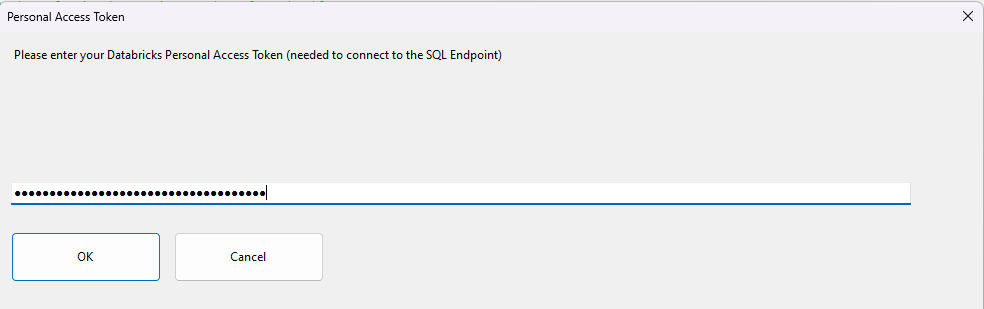
En cada ejecución del script, se te solicitará un token de acceso personal de Databricks. Esto es necesario para autenticarse en Databricks.
El script utiliza las tablas information_schema de Unity Catalog para recuperar información sobre las relaciones, por lo que quizá deba consultarlo con su administrador de Databricks para asegurarse de que tiene permisos para consultarlas.
Secuencia de comandos
Agregar descripciones de metadatos de Databricks
/*
 * Title: Add Databricks Metadata descriptions
 * Author: Johnny Winter, greyskullanalytics.com
 *
 * This script, when executed, will loop through the currently selected tables and send a query to Databricks to see if each table has metadata descriptions defined in Unity Catalog.
 * Where a description exists, this will be added to the semantic model description.
 * Step 1:  Select one or more tables in the model
 * Step 2:  Run this script
 * Step 3:  Enter your Databricks Personal Access Token when prompted
 * Step 4:  The script will connect to Databricks and update the table and column descriptions where they exist.
 *          For each table processed, a message box will display the number of descriptions updated.
 *          Click OK to continue to the next table.
 * Notes:
 *  -   This script requires the Databricks ODBC Driver (recommended) or legacy Simba Spark ODBC Driver to be installed (download from https://www.databricks.com/spark/odbc-drivers-download)
 *  -   The script auto-detects which driver is installed
 *  -   Each run of the script will prompt the user for a Databricks Personal Access Token
 */
#r "Microsoft.VisualBasic"
using System;
using System.Data.Odbc;
using System.Drawing;
using System.Text.RegularExpressions;
using System.Windows.Forms;
using Microsoft.VisualBasic;
using sysData = System.Data;

//code to create a masked input box for Databricks PAT token
public partial class PasswordInputForm : Form
{
    public string Password { get; private set; }

    private TextBox passwordTextBox;
    private Button okButton;
    private Button cancelButton;
    private Label promptLabel;

    public PasswordInputForm(string prompt, string title)
    {
        InitializeComponent(prompt, title);
    }

    private void InitializeComponent(string prompt, string title)
    {
        this.Text = title;
        this.Size = new System.Drawing.Size(4000, 1500);
        this.StartPosition = FormStartPosition.WindowsDefaultLocation;
        this.FormBorderStyle = FormBorderStyle.FixedDialog;
        this.MaximizeBox = false;
        this.MinimizeBox = false;

        // Prompt label
        promptLabel = new Label();
        promptLabel.Text = prompt;
        promptLabel.Location = new System.Drawing.Point(12, 15);
        promptLabel.Size = new System.Drawing.Size(360, 40);
        promptLabel.AutoSize = false;
        this.Controls.Add(promptLabel);

        // Password textbox
        passwordTextBox = new TextBox();
        passwordTextBox.Location = new System.Drawing.Point(12, 55);
        passwordTextBox.Size = new System.Drawing.Size(360, 20);
        passwordTextBox.UseSystemPasswordChar = true; // This masks the input
        passwordTextBox.KeyPress += (s, e) =>
        {
            if (e.KeyChar == (char)Keys.Return)
            {
                OkButton_Click(null, null);
                e.Handled = true;
            }
        };
        this.Controls.Add(passwordTextBox);

        // OK button
        okButton = new Button();
        okButton.Text = "OK";
        okButton.Location = new System.Drawing.Point(216, 85);
        okButton.Size = new System.Drawing.Size(150, 50);
        okButton.Click += OkButton_Click;
        this.Controls.Add(okButton);

        // Cancel button
        cancelButton = new Button();
        cancelButton.Text = "Cancel";
        cancelButton.Location = new System.Drawing.Point(297, 85);
        cancelButton.Size = new System.Drawing.Size(150, 50);
        cancelButton.Click += CancelButton_Click;
        this.Controls.Add(cancelButton);

        // Set default and cancel buttons
        this.AcceptButton = okButton;
        this.CancelButton = cancelButton;

        // Focus on textbox when form loads
        this.Load += (s, e) => passwordTextBox.Focus();
    }

    private void OkButton_Click(object sender, EventArgs e)
    {
        Password = passwordTextBox.Text;
        this.DialogResult = DialogResult.OK;
        this.Close();
    }

    private void CancelButton_Click(object sender, EventArgs e)
    {
        Password = string.Empty;
        this.DialogResult = DialogResult.Cancel;
        this.Close();
    }

    public static string ShowDialog(string prompt, string title)
    {
        using (var form = new PasswordInputForm(prompt, title))
        {
            if (form.ShowDialog() == DialogResult.OK)
                return form.Password;
            return string.Empty;
        }
    }
}

public static class MaskedInputHelper
{
    public static string GetMaskedInput(string prompt, string title, string defaultValue = "")
    {
        using (var form = new Form())
        {
            form.Text = title;
            form.Size = new System.Drawing.Size(1000, 500);
            form.StartPosition = FormStartPosition.CenterScreen;
            form.FormBorderStyle = FormBorderStyle.FixedDialog;
            form.MaximizeBox = false;
            form.MinimizeBox = false;

            var label = new Label()
            {
                Left = 12,
                Top = 15,
                Size = new System.Drawing.Size(900, 100),
                Text = prompt,
            };
            var textBox = new TextBox()
            {
                Left = 12,
                Top = 150,
                Size = new System.Drawing.Size(900, 100),
                UseSystemPasswordChar = true,
                Text = defaultValue,
            };
            var buttonOk = new Button()
            {
                Text = "OK",
                Size = new System.Drawing.Size(150, 50),
                Left = 12,
                Width = 150,
                Top = 200,
                DialogResult = DialogResult.OK,
            };
            var buttonCancel = new Button()
            {
                Text = "Cancel",
                Size = new System.Drawing.Size(150, 50),
                Left = 175,
                Width = 150,
                Top = 200,
                DialogResult = DialogResult.Cancel,
            };

            buttonOk.Click += (sender, e) =>
            {
                form.Close();
            };
            form.Controls.Add(label);
            form.Controls.Add(textBox);
            form.Controls.Add(buttonOk);
            form.Controls.Add(buttonCancel);
            form.AcceptButton = buttonOk;
            form.CancelButton = buttonCancel;

            return form.ShowDialog() == DialogResult.OK ? textBox.Text : string.Empty;
        }
    }
}

//Code to retrieve Databricks Connection information from the M Query in a table partition
public class DatabricksConnectionInfo
{
    public string ServerHostname { get; set; }
    public string HttpPath { get; set; }
    public string DatabaseName { get; set; }
    public string SchemaName { get; set; }
    public string TableName { get; set; }

    public override string ToString()
    {
        return $"Server: {ServerHostname}\n"
            + $"HTTP Path: {HttpPath}\n"
            + $"Database: {DatabaseName}\n"
            + $"Schema: {SchemaName}\n"
            + $"Table: {TableName}";
    }
}

public class PowerQueryMParser
{
    public static DatabricksConnectionInfo ParseMQuery(string mQuery)
    {
        if (string.IsNullOrWhiteSpace(mQuery))
            throw new ArgumentException("M query cannot be null or empty");

        var connectionInfo = new DatabricksConnectionInfo();

        try
        {
            // Parse Source line to extract server hostname and HTTP path
            ParseSourceLine(mQuery, connectionInfo);

            // Parse Database line to extract database name
            ParseDatabaseLine(mQuery, connectionInfo);

            // Parse Schema line to extract schema name
            ParseSchemaLine(mQuery, connectionInfo);

            // Parse Data line to extract table name
            ParseDataLine(mQuery, connectionInfo);

            return connectionInfo;
        }
        catch (Exception ex)
        {
            throw new InvalidOperationException($"Error parsing M query: {ex.Message}", ex);
        }
    }

    private static void ParseSourceLine(string mQuery, DatabricksConnectionInfo connectionInfo)
    {
        // Pattern to match both:
        // Source = DatabricksMultiCloud.Catalogs("hostname", "httppath", null),
        // Source = Databricks.Catalogs("hostname", "httppath", null),
        var sourcePattern =
            @"Source\s*=\s*Databricks(?:MultiCloud)?\.Catalogs\s*\(\s*""([^""]+)""\s*,\s*""([^""]+)""\s*,\s*null\s*\)";
        var sourceMatch = Regex.Match(
            mQuery,
            sourcePattern,
            RegexOptions.IgnoreCase | RegexOptions.Multiline
        );

        if (!sourceMatch.Success)
            throw new FormatException(
                "Could not find valid Source definition in M query (supports both Databricks and DatabricksMultiCloud connectors)"
            );

        connectionInfo.ServerHostname = sourceMatch.Groups[1].Value;
        connectionInfo.HttpPath = sourceMatch.Groups[2].Value;
    }

    private static void ParseDatabaseLine(string mQuery, DatabricksConnectionInfo connectionInfo)
    {
        // Pattern to match: Database = Source{[Name="databasename",Kind="Database"]}[Data],
        var databasePattern =
            @"Database\s*=\s*Source\s*{\s*\[\s*Name\s*=\s*""([^""]+)""\s*,\s*Kind\s*=\s*""Database""\s*\]\s*}\s*\[\s*Data\s*\]";
        var databaseMatch = Regex.Match(
            mQuery,
            databasePattern,
            RegexOptions.IgnoreCase | RegexOptions.Multiline
        );

        if (!databaseMatch.Success)
            throw new FormatException("Could not find valid Database definition in M query");

        connectionInfo.DatabaseName = databaseMatch.Groups[1].Value;
    }

    private static void ParseSchemaLine(string mQuery, DatabricksConnectionInfo connectionInfo)
    {
        // Pattern to match: Schema = Database{[Name="schemaname",Kind="Schema"]}[Data],
        var schemaPattern =
            @"Schema\s*=\s*Database\s*{\s*\[\s*Name\s*=\s*""([^""]+)""\s*,\s*Kind\s*=\s*""Schema""\s*\]\s*}\s*\[\s*Data\s*\]";
        var schemaMatch = Regex.Match(
            mQuery,
            schemaPattern,
            RegexOptions.IgnoreCase | RegexOptions.Multiline
        );

        if (!schemaMatch.Success)
            throw new FormatException("Could not find valid Schema definition in M query");

        connectionInfo.SchemaName = schemaMatch.Groups[1].Value;
    }

    private static void ParseDataLine(string mQuery, DatabricksConnectionInfo connectionInfo)
    {
        // Pattern to match: Data = Schema{[Name="tablename",Kind="Table"]}[Data]
        var dataPattern =
            @"Data\s*=\s*Schema\s*{\s*\[\s*Name\s*=\s*""([^""]+)""\s*,\s*Kind\s*=\s*""Table""\s*\]\s*}\s*\[\s*Data\s*\]";
        var dataMatch = Regex.Match(
            mQuery,
            dataPattern,
            RegexOptions.IgnoreCase | RegexOptions.Multiline
        );

        if (!dataMatch.Success)
            throw new FormatException("Could not find valid Data definition in M query");

        connectionInfo.TableName = dataMatch.Groups[1].Value;
    }
}

////////////////////////////////////////////////////////////////////////////////////////////////////////////////////////////////////////
//main script


//check that user has a table selected
if (Selected.Tables.Count == 0)
{
    // toggle the 'Running Macro' spinbox
    ScriptHelper.WaitFormVisible = false;
    Interaction.MsgBox("Select one or more tables", MsgBoxStyle.Critical, "Table Required");
    return;
}

//prompt for personal access token - required to authenticate to Databricks
string dbxPAT;
do
{
    // toggle the 'Running Macro' spinbox
    ScriptHelper.WaitFormVisible = false;
    dbxPAT = MaskedInputHelper.GetMaskedInput(
        "Please enter your Databricks Personal Access Token (needed to connect to the SQL Endpoint)",
        "Personal Access Token"
    );

    if (string.IsNullOrEmpty(dbxPAT))
    {
        return; // User cancelled
    }

    if (string.IsNullOrWhiteSpace(dbxPAT))
    {
        MessageBox.Show(
            "Personal Access Token required",
            "Personal Access Token required",
            MessageBoxButtons.OK,
            MessageBoxIcon.Warning
        );
    }
} while (string.IsNullOrWhiteSpace(dbxPAT));

// toggle the 'Running Macro' spinbox
ScriptHelper.WaitFormVisible = true;

// auto-detect Databricks ODBC driver
string driverPath;
string newDriverPath = @"C:\Program Files\Databricks ODBC Driver";
string legacyDriverPath = @"C:\Program Files\Simba Spark ODBC Driver";

if (System.IO.Directory.Exists(newDriverPath))
{
    driverPath = newDriverPath;
}
else if (System.IO.Directory.Exists(legacyDriverPath))
{
    driverPath = legacyDriverPath;
}
else
{
    ScriptHelper.WaitFormVisible = false;
    Interaction.MsgBox(
        @"No Databricks ODBC driver found.

Please install the Databricks ODBC Driver from:
https://www.databricks.com/spark/odbc-drivers-download

Expected installation paths:
  " + newDriverPath + @"
  " + legacyDriverPath,
        MsgBoxStyle.Critical,
        "ODBC Driver Not Found"
    );
    return;
}

//for each selected table, get the Databricks connection info from the partition info
foreach (var t in Selected.Tables)
{
    string mQuery = t.Partitions[t.Name].Expression;
    var connectionInfo = PowerQueryMParser.ParseMQuery(mQuery);
    var columnDescriptions = 0;
    var tableDescriptions = 0;
    // Access individual components
    string serverHostname = connectionInfo.ServerHostname;
    string httpPath = connectionInfo.HttpPath;
    string databaseName = connectionInfo.DatabaseName;
    string schemaName = connectionInfo.SchemaName;
    string tableName = connectionInfo.TableName;
    //set DBX connection string
    var odbcConnStr =
        @"Driver=" + driverPath + ";Host="
        + serverHostname
        + ";Port=443;HTTPPath="
        + httpPath
        + ";SSL=1;ThriftTransport=2;AuthMech=3;UID=token;PWD="
        + dbxPAT;

    //test connection
    OdbcConnection conn = new OdbcConnection(odbcConnStr);
    try
    {
        conn.Open();
    }
    catch
    {
        // toggle the 'Running Macro' spinbox
        ScriptHelper.WaitFormVisible = false;
        Interaction.MsgBox(
            @"Connection failed (using driver: " + driverPath + @")

Please check the following prerequisites:

- you must have the Databricks ODBC Driver installed
(download from https://www.databricks.com/spark/odbc-drivers-download)

- check that the Databricks server name "
                + serverHostname
                + @" is correct

- check that the Databricks SQL endpoint / HTTP Path "
                + httpPath
                + @" is correct

- check that you have used a valid Personal Access Token",
            MsgBoxStyle.Critical,
            "Connection Error"
        );
        return;
    }

    //get table metadata
    var tableQuery =
        "SELECT comment FROM "
        + databaseName
        + ".information_schema.tables WHERE table_schema = '"
        + schemaName
        + "' AND table_name = '"
        + tableName
        + "'";
    OdbcDataAdapter td = new OdbcDataAdapter(tableQuery, conn);
    var dbxTable = new sysData.DataTable();

    try
    {
        td.Fill(dbxTable);
    }
    catch
    {
        // toggle the 'Running Macro' spinbox
        ScriptHelper.WaitFormVisible = false;
        Interaction.MsgBox(
            @"Connection failed

Either:
    - the table "
                + schemaName
                + "."
                + tableName
                + " does not exist"
                + @"

    - you do not have permissions to query this table

    - the connection timed out. Please check that the SQL Endpoint cluster is running",
            MsgBoxStyle.Critical,
            "Connection Error - Table Metadata"
        );
        return;
    }
    string tableUpdate = "";
    foreach (sysData.DataRow row in dbxTable.Rows)
    {
        if (t.Description != row["comment"].ToString())
        {
            t.Description = row["comment"].ToString();
            tableUpdate = t.Name + " table description updated.";
        }
    }

    //get column metadata
    var columnsQuery = @"DESCRIBE " + databaseName + "." + schemaName + "." + tableName;
    OdbcDataAdapter da = new OdbcDataAdapter(columnsQuery, conn);
    var dbxColumns = new sysData.DataTable();

    try
    {
        da.Fill(dbxColumns);
    }
    catch
    {
        // toggle the 'Running Macro' spinbox
        ScriptHelper.WaitFormVisible = false;
        Interaction.MsgBox(
            @"Connection failed

Either:
    - the table "
                + schemaName
                + "."
                + tableName
                + " does not exist"
                + @"

    - you do not have permissions to query this table

    - the connection timed out. Please check that the SQL Endpoint cluster is running",
            MsgBoxStyle.Critical,
            "Connection Error - Column Metadata"
        );
        return;
    }

    //update column descriptions
    int counter = 0;
    foreach (sysData.DataRow row in dbxColumns.Rows)
    {
        string sourceColumn = row["col_name"].ToString();
        if (sourceColumn.Length != 0)
        {
            foreach (var c in t.DataColumns)
            {
                if (c.SourceColumn == sourceColumn && c.Description != row["comment"].ToString())
                {
                    c.Description = row["comment"].ToString();
                    counter = counter + 1;
                }
            }
        }
    }
    string msg;
    if (tableUpdate.Length > 0)
    {
        msg =
            tableUpdate
            + @"

"
            + counter
            + " descriptions updated on "
            + t.Name;
    }
    else
    {
        msg = counter + " descriptions updated on " + t.Name;
    }
    // toggle the 'Running Macro' spinbox
    ScriptHelper.WaitFormVisible = false;
    Interaction.MsgBox(msg, MsgBoxStyle.Information, "Update Metadata Descriptions");
    // toggle the 'Running Macro' spinbox
    ScriptHelper.WaitFormVisible = true;
    conn.Close();
}
Explicación
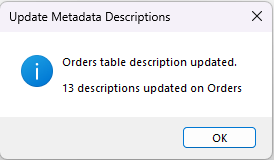
El script usa WinForms para solicitar un token de acceso personal de Databricks, que se utiliza para autenticarse en Databricks. Detecta automáticamente si está instalado el nuevo Databricks ODBC Driver o el controlador heredado Simba Spark ODBC Driver. Para cada tabla seleccionada, el script recupera la información de la cadena de conexión de Databricks y el esquema y el nombre de la tabla a partir de la consulta M de la partición de la tabla seleccionada. A continuación, con el controlador ODBC detectado, envía a Databricks una consulta SQL que interroga las tablas information_schema para obtener la descripción de la tabla definida en Unity Catalog. A continuación, se actualiza la descripción de la tabla en el modelo semántico. También se envía a la tabla seleccionada una segunda consulta SQL con el comando DESCRIBE para obtener las descripciones de las columnas. Los resultados se recorren en un bucle y se añaden descripciones al modelo. Una vez que el script se ha ejecutado en cada tabla seleccionada, se muestra un cuadro de diálogo con el número de descripciones actualizadas.
Salida de ejemplo