Crear un nuevo parámetro M y agregarlo a las particiones M existentes
Objetivo del script
Si quieres reemplazar una cadena en las particiones M del modelo (por ejemplo, la cadena de conexión, la condición de filtro, el nombre de una columna, etc.) por el valor de un parámetro.
Note
Este script solo funciona con parámetros del tipo de datos string.
Para otros tipos de datos, modifica los tipos de las variables y el valor del parámetro según corresponda.
Script
Crear un nuevo parámetro M y agregarlo a las particiones M existentes
// This script creates a new M Parameter as a 'Shared Expression'.
// It will also find the default value in all M partitions and replace them with the parameter object name.
//#r "System.Drawing"

using System.Drawing;
using System.Text.RegularExpressions;
using System.Windows.Forms;

// Hide the 'Running Macro' spinbox
ScriptHelper.WaitFormVisible = false;

// Initialize variables
string _ParameterName = "New Parameter";
string _ParameterValue = "ParameterValue";

// WinForms prompt to get Parameter Name / Value input
using (Form prompt = new Form())
{
    Font formFont = new Font("Segoe UI", 11);

    // Prompt config
    prompt.AutoSize = true;
    prompt.MinimumSize = new Size(380, 120);
    prompt.Text = "Create New M Parameter";
    prompt.StartPosition = FormStartPosition.CenterScreen;

    // Find: label
    Label parameterNameLabel = new Label() { Text = "Enter Name:" };
    parameterNameLabel.Location = new Point(20, 20);
    parameterNameLabel.AutoSize = true;
    parameterNameLabel.Font = formFont;

    // Textbox for inputing the substring text
    TextBox parameterNameBox = new TextBox();
    parameterNameBox.Width = 200;
    parameterNameBox.Location = new Point(parameterNameLabel.Location.X + parameterNameLabel.Width + 20, parameterNameLabel.Location.Y - 4);
    parameterNameBox.SelectedText = "New Parameter";
    parameterNameBox.Font = formFont;

    // Replace: label
    Label parameterValueLabel = new Label() { Text = "Enter Value:" };
    parameterValueLabel.Location = new Point(parameterNameLabel.Location.X, parameterNameLabel.Location.Y + parameterNameLabel.Height + 20);
    parameterValueLabel.AutoSize = true;
    parameterValueLabel.Font = formFont;

    // Textbox for inputting the substring text
    TextBox parameterValueBox = new TextBox() { Left = parameterValueLabel.Right + 20, Top = parameterValueLabel.Location.Y - 4, Width = parameterNameBox.Width };
    parameterValueBox.SelectedText = "Parameter Value";
    parameterValueBox.Font = formFont;

    // OK Button
    Button okButton = new Button() { Text = "Create", Left = 20, Width = 75, Top = parameterValueBox.Location.Y + parameterValueBox.Height + 20 };
    okButton.MinimumSize = new Size(75, 25);
    okButton.AutoSize = true;
    okButton.Font = formFont;

    // Cancel Button
    Button cancelButton = new Button() { Text = "Cancel", Left = okButton.Location.X + okButton.Width + 10, Top = okButton.Location.Y };
    cancelButton.MinimumSize = new Size(75, 25);
    cancelButton.AutoSize = true;
    cancelButton.Font = formFont;

    // Button actions
    okButton.Click += (sender, e) => { _ParameterName = parameterNameBox.Text; _ParameterValue = parameterValueBox.Text; prompt.DialogResult = DialogResult.OK; };
    cancelButton.Click += (sender, e) => { prompt.DialogResult = DialogResult.Cancel; };

    prompt.AcceptButton = okButton;
    prompt.CancelButton = cancelButton;

    prompt.Controls.Add(parameterNameLabel);
    prompt.Controls.Add(parameterNameBox);
    prompt.Controls.Add(parameterValueLabel);
    prompt.Controls.Add(parameterValueBox);
    prompt.Controls.Add(okButton);
    prompt.Controls.Add(cancelButton);

    // The user clicked OK, so perform the find-and-replace logic
    if (prompt.ShowDialog() == DialogResult.OK)
    {

        // Creates the parameter
        Model.AddExpression(
            _ParameterName,
            @"
        """ + _ParameterValue +
        @""" meta
        [
            IsParameterQuery = true,
            IsParameterQueryRequired = true,
            Type = type text
        ]"
        );


        // Informs the user that the parameter was successfully created
        Info (
            "Successfully created a new parameter: " + @"""" +
            _ParameterName + @"""" +
            "\nDefault value: " + @"""" +
            _ParameterValue + @"""");


        // Finds the parameter default value in M Partitions & replaces with the parameter name
        string _Find = @"""" + _ParameterValue + @"""";
        string _Replace = @"#""" + _ParameterName + @"""";

        int _NrMPartitions = 0;
        int _NrReplacements = 0;
        var _ReplacementsList = new List<string>();

        foreach ( var _Tables in Model.Tables )
        {
            foreach ( var _p in _Tables.Partitions )
            {
                if ( _p.SourceType == PartitionSourceType.M )
                {
                    if ( _p.Expression != _p.Expression.Replace( _Find, _Replace ) )
                    {
                        _p.Expression = _p.Expression.Replace( _Find, _Replace );

                        // Tracks which M partitions were replaced (and how many)
                        _NrReplacements = _NrReplacements + 1;
                        _ReplacementsList.Add( _p.Name );
                    }

                // Counts the total # M Partitions
                _NrMPartitions = _NrMPartitions + 1;
                }
            }
        }


        // Makes a bulleted list of all the M partitions that were replaced
        string _ReplacedPartitions = " • " + String.Join("\n • ", _ReplacementsList );


        // Informs
        //      - Whether the Find & Replace was successful
        //      - How many M partitions were replaced
        //      - Which M partitions had the Find & Replace done
        Info (
            "Successfully replaced\n\n " +
            _Find +
            "\n\n with: \n\n" +
            _Replace +
            "\n\n in " +
            Convert.ToString(_NrReplacements) +
            " of " +
            Convert.ToString(_NrMPartitions) +
            " M Partitions:\n" +
            _ReplacedPartitions
        );

    }
    else
    {
    Error ( "Cancelled input! Ended script without changes.");
    }
}
Explicación
Este fragmento abre un cuadro de diálogo para que el usuario introduzca el nombre y el valor del parámetro y, después, crea el parámetro como una 'expresión compartida' en el modelo.
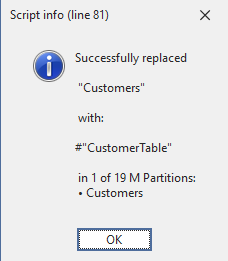
Luego buscará el valor predeterminado en todas las particiones M y lo reemplazará por #"ParameterName".
Salida de ejemplo