Configurar la actualización incremental
Objetivo del script
Si quieres configurar la actualización incremental para una tabla de importación basada en un campo de fecha específico.
Este script funciona con columnas de fecha datetime, date o integer en las que quieras configurar la actualización incremental.
Para usar el script, selecciona la columna de fecha de la tabla para la que quieras configurar la actualización incremental y, después, ejecuta el script. El script solo se ejecutará si aún no tienes los parámetros #"RangeStart" y #"RangeEnd" y la tabla seleccionada todavía no tiene configurada una política de actualización.
Note
Este script modificará automáticamente la partición M de la tabla para agregar el paso de filtro. Asegúrate de comprobar que se ha hecho correctamente.
Si tienes muchos pasos, asegúrate de mover este paso a un punto en el que pueda plegarse hasta la fuente de datos. Asegúrate de ajustar todas las `#"Step References" en Power Query
Note
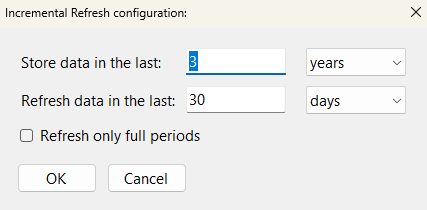
Este script usa la entrada del usuario para generar la política de actualización. Asegúrate de introducir los valores correctos en el cuadro de diálogo de entrada del usuario.
Script
Implementar la actualización incremental para la columna seleccionada
// This script will automatically generate an Incremental Refresh policy for a selected table
// It is generated based on the selected column
// It requires input from the user with a dialogue pop-up box.
// This script will automatically generate an Incremental Refresh policy for a selected table
// It is generated based on the selected column
// It requires input from the user with a dialogue pop-up box.
using System.Drawing;
using System.Windows.Forms;

// Hide the 'Running Macro' spinbox
ScriptHelper.WaitFormVisible = false;

// Initialize Variables
Table _Table                = Model.Tables[0];
string _MExpression         = "";
Column _Column              = Model.AllColumns.ToList()[0];
string _ColumnName          = "";
DataType _ColumnDataType    = DataType.DateTime;

try
    {
        // Select a Table for which you will configure Incremental Refresh.
        // The Refresh Policy will be enabled and configured for this table.
        _Table =
            Model.Tables.Where(

                // Exclude tables that already have a refresh policy
                t =>
                t.EnableRefreshPolicy != true &&

                // Include only 'Table' objects
                t.ObjectType == ObjectType.Table &&

                // Exclude Calculated Tables
                t.Columns[0].Type != ColumnType.CalculatedTableColumn &&

                // Only include tables that have a column on the "From" side of the relationship
                (Model.Relationships.Count() > 0 ?
                t.Columns.Any(c =>  Model.Relationships.Any(r => r.FromColumn == c) ) : true) &&

                // Exclude tables that don't have a DateTime or Integer column
                (
                    t.Columns.Any(c => c.DataType == DataType.DateTime) ||
                    t.Columns.Any(c => c.DataType == DataType.Int64)
                )
            ).SelectTable(null,"Select a Table for which you will configure Incremental Refresh:");

        _MExpression = _Table.Partitions[0].Expression;

    try
    {
        // Select the column to apply the Refresh Policy.
        // The M Expression will be modified using the name of this column.
        _Column =
            _Table.Columns.Where(

                // Include only DateTime or Int columns
                c =>
                c.DataType == DataType.DateTime ||
                c.DataType == DataType.Int64

            ).SelectColumn(null, "Select a DateTime or DateKey (Int) Column to apply the Refresh Policy.");

        _ColumnName = _Column.DaxObjectName;
        _ColumnDataType = _Column.DataType;

        try
        {   // Test if 'RangeStart' exists
            Model.Expressions.Contains(Model.Expressions["RangeStart"]);
            Info ("RangeStart already exists!");
        }
        catch
        {
            // Add RangeStart parameter
            Model.AddExpression(
                "RangeStart",
                @"
            #datetime(2023, 01, 01, 0, 0, 0) meta
            [
                IsParameterQuery = true,
                IsParameterQueryRequired = true,
                Type = type datetime
            ]"
            );

            // Success message for adding 'RangeStart'
            Info ( "Created 'RangeStart' M Parameter!" );
        }

        // Test if the RangeEnd parameter exists
        try
        {   // Test if 'RangeEnd' exists
            Model.Expressions.Contains(Model.Expressions["RangeEnd"]);
            Info ("RangeEnd already exists!");
        }
        catch
        {
            // Add RangeEnd parameter
            Model.AddExpression(
                "RangeEnd",
                @"
            #datetime(2023, 31, 01, 0, 0, 0) meta
            [
                IsParameterQuery = true,
                IsParameterQueryRequired = true,
                Type = type datetime
            ]"
            );

            // Success message for adding 'RangeEnd'
            Info ( "Created 'RangeEnd' M Parameter!" );

        }

        // Incremental Refresh Configuration
        // Input box config
        Font _fontConfig = new Font("Segoe UI", 11);

        // Label for how long data should be stored
        var storeDataLabel = new Label();
        storeDataLabel.Text = "Store data in the last:";
        storeDataLabel.Location = new Point(20, 20);
        storeDataLabel.AutoSize = true;
        storeDataLabel.Font = _fontConfig;

        // User input for how long data should be stored
        var storeDataTextBox = new TextBox();
        storeDataTextBox.Location = new Point(storeDataLabel.Location.X + TextRenderer.MeasureText(storeDataLabel.Text, storeDataLabel.Font).Width + 20, storeDataLabel.Location.Y);
        storeDataTextBox.Size = new Size(100, 20);
        storeDataTextBox.Text = "3";
        storeDataTextBox.Font = _fontConfig;

        // User selection for how long data should be stored (granularity)
        var storeDataComboBox = new ComboBox();
        storeDataComboBox.Location = new Point(storeDataTextBox.Location.X + storeDataTextBox.Width + 20, storeDataLabel.Location.Y);
        storeDataComboBox.Size = new Size(100, 20);
        storeDataComboBox.DropDownStyle = ComboBoxStyle.DropDownList;
        storeDataComboBox.Items.AddRange(new object[] { "days", "months", "quarters", "years" });
        storeDataComboBox.SelectedIndex = 3;
        storeDataComboBox.Font = _fontConfig;

        // Label for how much data should be refreshed
        var refreshDataLabel = new Label();
        refreshDataLabel.Text = "Refresh data in the last:";
        refreshDataLabel.Location = new Point(20, storeDataLabel.Location.Y + storeDataLabel.Height + 15);
        refreshDataLabel.AutoSize = true;
        refreshDataLabel.Font = _fontConfig;

        // User input for how much data should be refreshed
        var refreshDataTextBox = new TextBox();
        refreshDataTextBox.Location = new Point(storeDataTextBox.Location.X, refreshDataLabel.Location.Y);
        refreshDataTextBox.Size = new Size(100, 20);
        refreshDataTextBox.Text = "30";
        refreshDataTextBox.Font = _fontConfig;

        // User selection for how much data should be refreshed (Period)
        var refreshDataComboBox = new ComboBox();
        refreshDataComboBox.Location = new Point(storeDataComboBox.Location.X, refreshDataLabel.Location.Y);
        refreshDataComboBox.Size = new Size(100, 20);
        refreshDataComboBox.DropDownStyle = ComboBoxStyle.DropDownList;
        refreshDataComboBox.Items.AddRange(new object[] { "days", "months", "quarters", "years" });
        refreshDataComboBox.SelectedIndex = 0;
        refreshDataComboBox.Font = _fontConfig;

        // User input to refresh full periods or not
        var fullPeriodsCheckBox = new CheckBox();
        fullPeriodsCheckBox.Text = "Refresh only full periods";
        fullPeriodsCheckBox.Location = new Point(storeDataLabel.Location.X + 3, refreshDataLabel.Location.Y + refreshDataLabel.Height + 15);
        fullPeriodsCheckBox.AutoSize = true;
        fullPeriodsCheckBox.Font = _fontConfig;

        // Form OK button
        var okButton = new Button();
        okButton.Text = "OK";
        okButton.Location = new Point(storeDataLabel.Location.X, fullPeriodsCheckBox.Location.Y + fullPeriodsCheckBox.Height + 15);
        okButton.MinimumSize = new Size(80, 25);
        okButton.AutoSize = true;
        okButton.DialogResult = DialogResult.OK;
        okButton.Font = _fontConfig;

        // Form cancel button
        var cancelButton = new Button();
        cancelButton.Text = "Cancel";
        cancelButton.Location = new Point(okButton.Location.X + okButton.Width + 10, okButton.Location.Y);
        cancelButton.MinimumSize = new Size(80, 25);
        cancelButton.AutoSize = true;
        cancelButton.DialogResult = DialogResult.Cancel;
        cancelButton.Font = _fontConfig;

        // Adjust the Location of the storeDataLabel to align with the storeDataTextBox
        storeDataLabel.Location = new Point(storeDataLabel.Location.X, storeDataLabel.Location.Y + 4);
        refreshDataLabel.Location = new Point(refreshDataLabel.Location.X, refreshDataLabel.Location.Y + 4);

        // Form config
        var form = new Form();
        form.Text = "Incremental Refresh configuration:";
        form.AutoSize = true;
        form.MinimumSize = new Size(450, 0);
        form.FormBorderStyle = FormBorderStyle.FixedDialog;
        form.MaximizeBox = false;
        form.MinimizeBox = false;

        // Open the dialogue in the center of the screen
        form.StartPosition = FormStartPosition.CenterScreen;

        // Set the AutoScaleMode property to Dpi
        form.AutoScaleMode = AutoScaleMode.Dpi;

        // Add controls to form specified above
        form.Controls.Add(storeDataLabel);
        form.Controls.Add(storeDataTextBox);
        form.Controls.Add(storeDataComboBox);
        form.Controls.Add(refreshDataLabel);
        form.Controls.Add(refreshDataTextBox);
        form.Controls.Add(refreshDataComboBox);
        form.Controls.Add(fullPeriodsCheckBox);
        form.Controls.Add(okButton);
        form.Controls.Add(cancelButton);

        // Draw the form
        var result = form.ShowDialog();

        // Get the values of the user input if entered
        if (result == DialogResult.OK)
        {
            // Enables the refresh policy
            _Table.EnableRefreshPolicy = true;

            var storeDataValue = storeDataTextBox.Text;
            var storeDataComboBoxValue = storeDataComboBox.SelectedItem.ToString();
            var refreshDataValue = refreshDataTextBox.Text;
            var refreshDataComboBoxValue = refreshDataComboBox.SelectedItem.ToString();
            var fullPeriodsChecked = fullPeriodsCheckBox.Checked;

            // Display the input values in a message box
            var message = string.Format(
                "Store data in the last: {0} {1}" +
                "\nRefresh data in the last: {2} {3}" +
                "\nRefresh only full periods: {4}",
                storeDataTextBox.Text,
                storeDataComboBox.SelectedItem.ToString(),
                refreshDataTextBox.Text,
                refreshDataComboBox.SelectedItem.ToString(),
                fullPeriodsCheckBox.Checked);

            Info(message);

            // Convert StoreDataGranularity to correct TOM Property
            RefreshGranularityType StoreDataGranularity = RefreshGranularityType.Day;
            switch (storeDataComboBox.SelectedItem.ToString())
            {
                case "years":
                    StoreDataGranularity = RefreshGranularityType.Year;
                    break;

                case "quarters":
                    StoreDataGranularity = RefreshGranularityType.Quarter;
                    break;

                case "months":
                    StoreDataGranularity = RefreshGranularityType.Month;
                    break;

                case "days":
                    StoreDataGranularity = RefreshGranularityType.Day;
                    break;

                default:
                    Error("Bad selection for Incremental Granularity.");
                    break;
            }


            // Convert IncrementalGranularity to correct TOM Property
            RefreshGranularityType IncrementalPeriodGranularity = RefreshGranularityType.Year;
            switch (refreshDataComboBox.SelectedItem.ToString())
            {
                case "years":
                    IncrementalPeriodGranularity = RefreshGranularityType.Year;
                    break;

                case "quarters":
                    IncrementalPeriodGranularity = RefreshGranularityType.Quarter;
                    break;

                case "months":
                    IncrementalPeriodGranularity = RefreshGranularityType.Month;
                    break;

                case "days":
                    IncrementalPeriodGranularity = RefreshGranularityType.Day;
                    break;

                default:
                    Error ( "Bad selection for Incremental Granularity." );
                    break;
            }

            // Convert RefreshCompletePeriods checkbox to correct TOM property
            int RefreshCompletePeriods;
            if ( fullPeriodsCheckBox.Checked == true )
            {
            RefreshCompletePeriods = -1;
            }
            else
            {
            RefreshCompletePeriods = 0;
            }

            // Set incremental window: period to be refreshed
            _Table.IncrementalGranularity = IncrementalPeriodGranularity;

            // Default: 30 days - change # if you want
            _Table.IncrementalPeriods = Convert.ToInt16(refreshDataTextBox.Text);

            // Only refresh complete days. Change to 0 if you don't want.
            _Table.IncrementalPeriodsOffset = RefreshCompletePeriods;

            // Set rolling window: period to be archived
            // Granularity = day, can change to month, quarter, year...
            _Table.RollingWindowGranularity = StoreDataGranularity;

            // Keep data for 1 year. Includes 1 full year and current partial year
            //    i.e. if it is Nov 2023, keeps data from Jan 1, 2022.
            //    On Jan 1, 2024, it will drop 2022 automatically.
            _Table.RollingWindowPeriods = Convert.ToInt16(storeDataTextBox.Text);

            // If the selected date column is an integer of type YYYYMMDD...
            if ( _ColumnDataType == DataType.Int64 )
            {
                // Add DateTimeToInt Function
                var _DateTimeToInt =
                    Model.AddExpression(
                        "fxDateTimeToInt",
                        @"(x as datetime) => Date.Year(x) * 10000 + Date.Month(x) * 100 + Date.Day(x)"
            );

            _DateTimeToInt.SetAnnotation("PBI_ResultType", "Function");
            _DateTimeToInt.Kind = ExpressionKind.M;

            // Source expression obtained from the original M partition
            _Table.SourceExpression =

                // Gets expression before final "in" keyword
                _MExpression.Split("\nin")[0].TrimEnd() +

                // Adds comma and newline
                ",\n" +

                // Adds step called "Incremental Refresh" for filtering
                @"    #""Incremental Refresh"" = Table.SelectRows( " +

                // Gets name of last step (after "in" keyword)
                _MExpression.Split("\nin")[1].TrimStart() +

                // Adds 'each' keyword
                @", each " +

                // Bases incremental refresh on current column name
                _ColumnName +

                // Greater than or equal to RangeStart
                @" >= fxDateTimeToInt ( #""RangeStart"" ) and " +

                // and
                _ColumnName +

                // Less than RangeEnd
                @" < fxDateTimeToInt ( #""RangeEnd"" ) )" +

                // re-add 'in' keyword
                "\nin\n" +

                // Reference final step just added
                @"    #""Incremental Refresh""";
            }


            // Otherwise treat it like a normal date/datetime column
            else
            {
                // Source expression obtained from the original M partition
                _Table.SourceExpression =
                    // Gets expression before final "in" keyword
                    _MExpression.Split("\nin")[0].TrimEnd() +

                    // Adds comma and newline
                    ",\n" +

                    // Adds step called "Incremental Refresh" for filtering
                    @"    #""Incremental Refresh"" = Table.SelectRows( " +

                    // Gets name of last step (after "in" keyword)
                    _MExpression.Split("\nin")[1].TrimStart() +

                    // Adds 'each' keyword
                    @", each " +

                    // Bases incremental refresh on current column name
                    _ColumnName +

                    // Greater than or equal to RangeStart
                    @" >= Date.From ( #""RangeStart"" ) and " +

                    // and
                    _ColumnName +

                    // Less than RangeEnd
                    @" < Date.From ( #""RangeEnd"" ) )" +

                    // re-add 'in' keyword
                    "\nin\n" +

                    // Reference final step just added
                    @"    #""Incremental Refresh""";
            }

            // Success message for Refresh Policy configuration
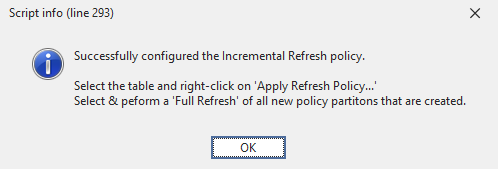
            Info (
                "Successfully configured the Incremental Refresh policy.\n" +
                "\nSelect the table and right-click on 'Apply Refresh Policy...'" +
                "\nSelect & peform a 'Full Refresh' of all new policy partitons that are created."
            );
            }
        else if (result == DialogResult.Cancel)
        {
            // if the user clicks the Cancel button, close the form and exit the script
            form.Close();
            Error ( "Cancelled configuration! Ending script without changes." );
            return;
        }
    }
    catch
    {
        Error( "No valid column selected! Ending script without changes." );
    }

}
catch
{
    Error( "No valid table selected! Ending script without changes." );
}
Explicación
Este fragmento configurará la actualización incremental en la tabla seleccionada en función de la columna de fecha seleccionada.
Salida de ejemplo