Connect through OLE DB
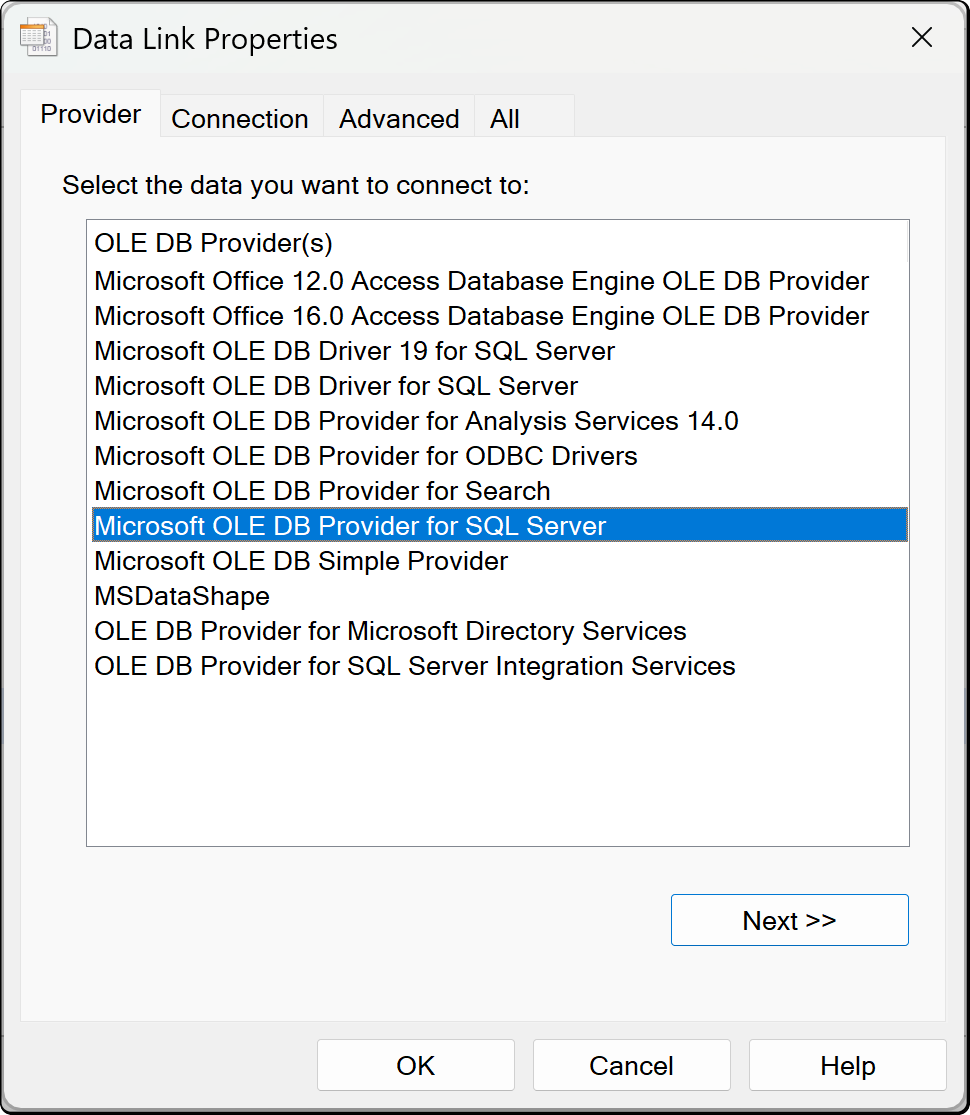
The OLE DB connector connects to sources that have an OLE DB provider but no usable ODBC driver. Selecting Model > Import tables... and choosing OLE DB opens the Windows Data Link Properties dialog.
Prerequisites
Install an OLE DB provider for the source that matches the architecture of your Tabular Editor build.
Warning
Analysis Services supports fewer OLE DB providers than Windows. If Analysis Services doesn't support the provider, the source imports in Tabular Editor but refresh fails on the server. Use a dedicated connection dialog where one exists, and ODBC where it doesn't.
Connection fields
The Data Link Properties dialog has these tabs:
| Field | Description |
|---|---|
| Provider tab | The OLE DB providers installed on this machine. Select the provider for the source |
| Connection tab | The data source, credentials and other settings the selected provider needs |
| Advanced and All tabs | Further provider-specific connection string properties |
If a saved connection string names a provider that isn't installed, a warning appears. Install the provider or select another one.
Authentication
The provider determines how you sign in, so enter its sign-in settings, such as a user name and password or integrated security, on the Connection tab.
Tabular Editor saves the connection settings and credentials in your user options file (see Where credentials are stored).