Load and save model metadata
Tabular Editor reads model metadata into memory from a file, a folder or a server, and writes it back to the same place or to a new one.
Note
Metadata defines tables, measures and relationships but contains no data, and loading a model doesn't load the rows in its tables. See Table Preview and Advanced refresh for working with data.
Loading a model
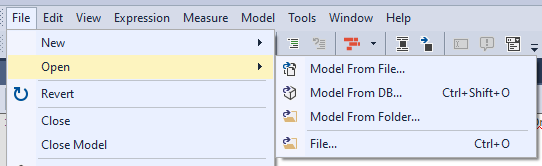
| Source | Command |
|---|---|
A Model.bim or .bim file |
File > Open > Model from File... |
| A folder structure, in either the JSON or the Tabular Model Definition Language (TMDL) format | File > Open > Model from Folder... |
| An Analysis Services or Power BI XMLA database | File > Open > Model from DB... (Ctrl+Shift+O) |
| A running instance of Power BI Desktop | File > Open > Model from DB..., or start Tabular Editor from Power BI Desktop's External Tools ribbon |
A .bim file must be Compatibility Level 1200 or newer. Earlier levels use the older XML-based format, which Tabular Editor doesn't open.
For everything Tabular Editor recognizes, including the supporting file types that aren't model metadata, see Supported file types.
Tip
File > Recent Tabular Models reopens a model you had open before.
Saving a model
File > Save (Ctrl+S) writes the model back where you loaded it from. A model loaded from a file goes back to that file. A model loaded from a folder goes back into that folder, in the format it already uses. A model loaded from a database is deployed back to that database.
To write a model somewhere else, or in a different format:
- File > Save As... saves the model metadata as a single
.bimfile. - File > Save to Folder... saves the model metadata as a folder structure, in either the JSON or the TMDL format, depending on the serialization mode under Tools > Preferences > File Formats > Save-to-folder.
Important
A model loaded from a legacy JSON folder structure is saved in that same format when you use File > Save, even if your preferences say TMDL. The format changes only when you use File > Save to Folder.... See TMDL.
Reloading
File > Reload from disk discards your changes since the last save and reloads the metadata from the source. If you have unsaved changes, a Reload model metadata? prompt appears first. The command label depends on the model source:
| Model source | Command |
|---|---|
| A file or folder | Reload from disk |
| A model in workspace mode | Reload from disk. The model reloads from its files and redeploys to the workspace database. |
| Analysis Services or Power BI, outside workspace mode | Reload from server |
| No model loaded | Reload from source, disabled |
In Tabular Editor 3.26 and earlier, and in Tabular Editor 2, the command is called File > Revert.
In Tabular Editor 3.27.0 and later, when an agent, a script or a git pull changes the metadata files of the open model, the model is reloaded, after a prompt if you have unsaved changes. See Auto-reload from disk.
Warning
Back up your model metadata before you let any tool write to it, Tabular Editor included. A save overwrites the source, and reloading can't bring back changes you've already saved.
Next steps
- Save to folder for the folder formats and the serialization settings that control how a model is split across files.
- Enabling parallel development using Git and Save to Folder if more than one person works on the model.
- Deployment to write the model to an Analysis Services server.