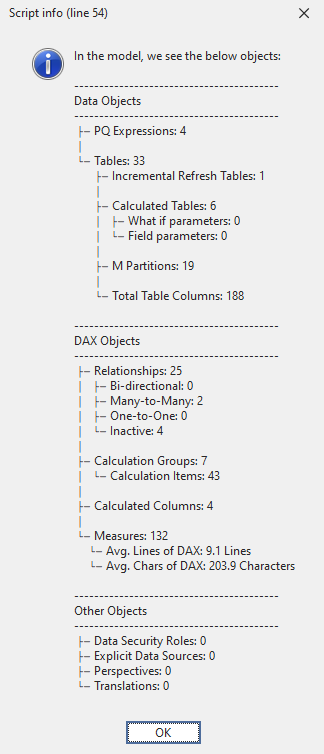
统计模型中的各类对象
脚本用途
如果你想快速了解模型里有哪些内容,以及各类对象有多少:
- 模型中有多少个度量值。
- 模型中有多少列和计算列。
- 模型中有多少个表和计算表格。
- 模型中有多少个关系、非活动关系等。
脚本
按类型统计模型对象数量
// This script counts objects in your model and displays them in a pop-up info box.
// It does not write any changes to this model.
//
// Use this script when you open a new model and need a 'helicopter view' on the contents.
//
// Count calculation groups & calculation items
int _calcgroups = 0;
int _calcitems = 0;
foreach (  var _calcgroup  in Model.CalculationGroups )
{
    _calcgroups = _calcgroups + 1;
    foreach (  var _item  in _calcgroup.CalculationItems )
    {
        _calcitems = _calcitems + 1;
    }
}

// Count partitions and DAX parameters
int _partitions = 0;
int _whatifparameters = 0;
int _fieldparameters = 0;
foreach (  var _table  in Model.Tables )
{
    foreach (  var _partition  in _table.Partitions )
    {
        string _type = Convert.ToString(_partition.SourceType);
        string _exp = Convert.ToString(_partition.Expression);
        if ( _type == "M" )
        {
            _partitions = _partitions + 1;
        }
        else if ( _type == "Calculated" && _exp.Contains("NAMEOF") )
        {
            _fieldparameters = _fieldparameters + 1;
        }
        else if ( _type == "Calculated" && _exp.Contains("GENERATESERIES") )
        {
            _whatifparameters = _whatifparameters + 1;
        }

    }
}

// Average measure length
decimal _numLines = 0;
decimal _numChars = 0;
int _measures = Model.AllMeasures.Count();
foreach ( var _measure in Model.AllMeasures )
{
    _numLines = _numLines + _measure.Expression.Split("\n").Length;
    _numChars = _numChars + _measure.Expression.Length;
}
_numLines = Math.Round(_numLines / _measures, 1);
_numChars = Math.Round(_numChars / _measures, 1);


// Return the pop-up
Info ( "In the model, we see the below objects:\n\n"

        + "-----------------------------------------\n"
        + "Data Objects\n"
        + "-----------------------------------------\n"
        + " ├─ PQ Expressions: " + Convert.ToString(Model.Expressions.Count()) + "\n"
        + " │\n"
        + " └─ Tables: " + Convert.ToString(Model.Tables.Count()) + "\n"
        + "       ├─ Incremental Refresh Tables: " +
            Convert.ToString(Model.Tables.Where(
                _ir =>
                Convert.ToString(_ir.EnableRefreshPolicy)
                ==
                "True").Count()) + "\n"

        + "       │\n"
        + "       ├─ Calculated Tables: " +
            Convert.ToString(
                Model.Tables.Where(
                    _tables =>
                    Convert.ToString(_tables.Columns[0].Type)
                    ==
                    "CalculatedTableColumn").Count()) + "\n"

        + "       │   ├─ What if parameters: " +
            Convert.ToString(_whatifparameters) + "\n"
        + "       │   └─ Field parameters: " +
            Convert.ToString(_fieldparameters) + "\n"
        + "       │\n"
        + "       ├─ M Partitions: " +
            Convert.ToString(_partitions) + "\n"
        + "       │\n"
        + "       └─ Total Table Columns: " +
            Convert.ToString(Model.AllColumns.Count()) + "\n\n"

        + "-----------------------------------------\n"
        + "DAX Objects\n"
        + "-----------------------------------------\n"
        + " ├─ Relationships: " +
            Convert.ToString(Model.Relationships.Count()) + "\n"
        + " │   ├─ Bi-directional: " +
            Convert.ToString(Model.Relationships.Where(
                _relationships =>
                Convert.ToString(_relationships.CrossFilteringBehavior)
                ==
                "BothDirections").Count()) + "\n"

        + " │   ├─ Many-to-Many: " +
            Convert.ToString(Model.Relationships.Where(
                _relationships =>
                Convert.ToString(_relationships.FromCardinality)
                ==
                "Many"
                &&
                Convert.ToString(_relationships.ToCardinality)
                ==
                "Many").Count()) + "\n"

        + " │   ├─ One-to-One: " +
            Convert.ToString(Model.Relationships.Where(
                _relationships =>
                Convert.ToString(_relationships.FromCardinality)
                ==
                "One"
                &&
                Convert.ToString(_relationships.ToCardinality)
                ==
                "One").Count()) + "\n"

        + " │   └─ Inactive: " +
            Convert.ToString(Model.Relationships.Where(
                _relationships =>
                Convert.ToString(_relationships.IsActive)
                ==
                "False").Count()) + "\n"

        + " │\n"
        + " ├─ Calculation Groups: " +
            Convert.ToString(_calcgroups) + "\n"
        + " │   └─ Calculation Items: " +
            Convert.ToString(_calcitems) + "\n"
        + " │\n"
        + " ├─ Calculated Columns: " +
            Convert.ToString(Model.AllColumns.Where(
                _columns =>
                Convert.ToString(_columns.Type)
                ==
                "Calculated").Count()) + "\n"

        + " │\n"
        + " └─ Measures: " +
            Convert.ToString(_measures) + "\n"
        + "     └─ Avg. Lines of DAX: " +
            Convert.ToString(_numLines) + " Lines \n"
        + "     └─ Avg. Chars of DAX: " +
            Convert.ToString(_numChars) + " Characters \n\n"

        + "-----------------------------------------\n"
        + "Other Objects\n"
        + "-----------------------------------------\n"
        + " ├─ Data Security Roles: " +
            Convert.ToString(Model.Roles.Count()) + "\n"
        + " ├─ Explicit Data Sources: " +
            Convert.ToString(Model.DataSources.Count()) + "\n"
        + " ├─ Perspectives: " +
            Convert.ToString(Model.Perspectives.Count()) + "\n"
        + " └─ Translations: " +
            Convert.ToString(Model.Cultures.Count()));
说明
这段代码会遍历模型并统计不同类型对象的数量,然后以手动构造的分层“节点树”格式展示出来。你可以把不需要的部分注释掉。
输出示例