创建新的 M 参数并将其添加到现有的 M 分区
脚本用途
若要在模型的 M 分区中替换某个字符串(即连接字符串、筛选条件、列名等)替换为参数值。
Note
此脚本仅适用于 string 数据类型的参数。对于其他数据类型,请相应修改变量类型和参数值。
脚本
创建新的 M 参数并将其添加到现有的 M 分区
// This script creates a new M Parameter as a 'Shared Expression'.
// It will also find the default value in all M partitions and replace them with the parameter object name.
//#r "System.Drawing"

using System.Drawing;
using System.Text.RegularExpressions;
using System.Windows.Forms;

// Hide the 'Running Macro' spinbox
ScriptHelper.WaitFormVisible = false;

// Initialize variables
string _ParameterName = "New Parameter";
string _ParameterValue = "ParameterValue";

// WinForms prompt to get Parameter Name / Value input
using (Form prompt = new Form())
{
    Font formFont = new Font("Segoe UI", 11);

    // Prompt config
    prompt.AutoSize = true;
    prompt.MinimumSize = new Size(380, 120);
    prompt.Text = "Create New M Parameter";
    prompt.StartPosition = FormStartPosition.CenterScreen;

    // Find: label
    Label parameterNameLabel = new Label() { Text = "Enter Name:" };
    parameterNameLabel.Location = new Point(20, 20);
    parameterNameLabel.AutoSize = true;
    parameterNameLabel.Font = formFont;

    // Textbox for inputing the substring text
    TextBox parameterNameBox = new TextBox();
    parameterNameBox.Width = 200;
    parameterNameBox.Location = new Point(parameterNameLabel.Location.X + parameterNameLabel.Width + 20, parameterNameLabel.Location.Y - 4);
    parameterNameBox.SelectedText = "New Parameter";
    parameterNameBox.Font = formFont;

    // Replace: label
    Label parameterValueLabel = new Label() { Text = "Enter Value:" };
    parameterValueLabel.Location = new Point(parameterNameLabel.Location.X, parameterNameLabel.Location.Y + parameterNameLabel.Height + 20);
    parameterValueLabel.AutoSize = true;
    parameterValueLabel.Font = formFont;

    // Textbox for inputting the substring text
    TextBox parameterValueBox = new TextBox() { Left = parameterValueLabel.Right + 20, Top = parameterValueLabel.Location.Y - 4, Width = parameterNameBox.Width };
    parameterValueBox.SelectedText = "Parameter Value";
    parameterValueBox.Font = formFont;

    // OK Button
    Button okButton = new Button() { Text = "Create", Left = 20, Width = 75, Top = parameterValueBox.Location.Y + parameterValueBox.Height + 20 };
    okButton.MinimumSize = new Size(75, 25);
    okButton.AutoSize = true;
    okButton.Font = formFont;

    // Cancel Button
    Button cancelButton = new Button() { Text = "Cancel", Left = okButton.Location.X + okButton.Width + 10, Top = okButton.Location.Y };
    cancelButton.MinimumSize = new Size(75, 25);
    cancelButton.AutoSize = true;
    cancelButton.Font = formFont;

    // Button actions
    okButton.Click += (sender, e) => { _ParameterName = parameterNameBox.Text; _ParameterValue = parameterValueBox.Text; prompt.DialogResult = DialogResult.OK; };
    cancelButton.Click += (sender, e) => { prompt.DialogResult = DialogResult.Cancel; };

    prompt.AcceptButton = okButton;
    prompt.CancelButton = cancelButton;

    prompt.Controls.Add(parameterNameLabel);
    prompt.Controls.Add(parameterNameBox);
    prompt.Controls.Add(parameterValueLabel);
    prompt.Controls.Add(parameterValueBox);
    prompt.Controls.Add(okButton);
    prompt.Controls.Add(cancelButton);

    // The user clicked OK, so perform the find-and-replace logic
    if (prompt.ShowDialog() == DialogResult.OK)
    {

        // Creates the parameter
        Model.AddExpression(
            _ParameterName,
            @"
        """ + _ParameterValue +
        @""" meta
        [
            IsParameterQuery = true,
            IsParameterQueryRequired = true,
            Type = type text
        ]"
        );


        // Informs the user that the parameter was successfully created
        Info (
            "Successfully created a new parameter: " + @"""" +
            _ParameterName + @"""" +
            "\nDefault value: " + @"""" +
            _ParameterValue + @"""");


        // Finds the parameter default value in M Partitions & replaces with the parameter name
        string _Find = @"""" + _ParameterValue + @"""";
        string _Replace = @"#""" + _ParameterName + @"""";

        int _NrMPartitions = 0;
        int _NrReplacements = 0;
        var _ReplacementsList = new List<string>();

        foreach ( var _Tables in Model.Tables )
        {
            foreach ( var _p in _Tables.Partitions )
            {
                if ( _p.SourceType == PartitionSourceType.M )
                {
                    if ( _p.Expression != _p.Expression.Replace( _Find, _Replace ) )
                    {
                        _p.Expression = _p.Expression.Replace( _Find, _Replace );

                        // Tracks which M partitions were replaced (and how many)
                        _NrReplacements = _NrReplacements + 1;
                        _ReplacementsList.Add( _p.Name );
                    }

                // Counts the total # M Partitions
                _NrMPartitions = _NrMPartitions + 1;
                }
            }
        }


        // Makes a bulleted list of all the M partitions that were replaced
        string _ReplacedPartitions = " • " + String.Join("\n • ", _ReplacementsList );


        // Informs
        //      - Whether the Find & Replace was successful
        //      - How many M partitions were replaced
        //      - Which M partitions had the Find & Replace done
        Info (
            "Successfully replaced\n\n " +
            _Find +
            "\n\n with: \n\n" +
            _Replace +
            "\n\n in " +
            Convert.ToString(_NrReplacements) +
            " of " +
            Convert.ToString(_NrMPartitions) +
            " M Partitions:\n" +
            _ReplacedPartitions
        );

    }
    else
    {
    Error ( "Cancelled input! Ended script without changes.");
    }
}
说明
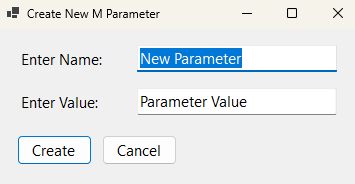
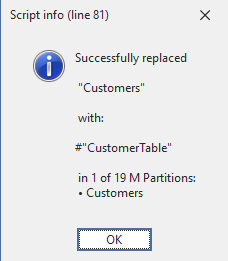
这段代码会打开一个对话框,让你输入参数名称和值,然后在模型中以“共享表达式”的形式创建该参数。随后,它会在所有 M 分区中搜索默认值,并将其替换为 #"ParameterName"。
输出示例