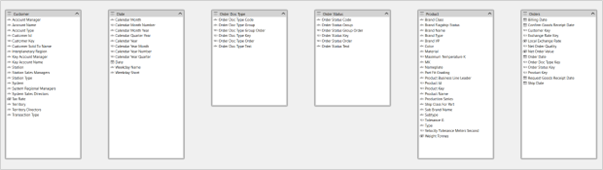
创建 Databricks 关系
脚本用途
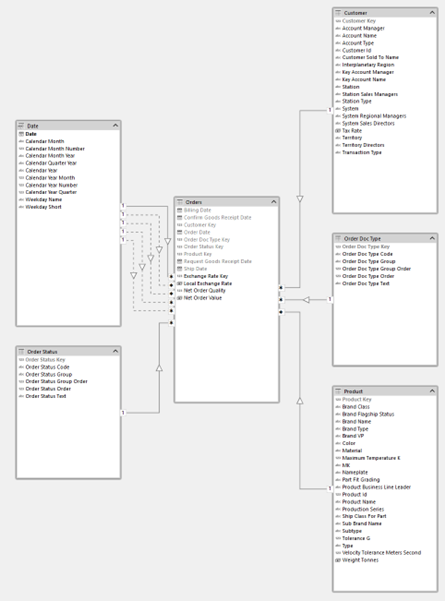
该脚本作为 Tabular Editor x Databricks 系列的一部分编写。在 Unity Catalog 中,可以在表之间定义主键和外键关系。此脚本可复用这些信息,在 Tabular Editor 中自动检测并创建关系。在导入这些关系时,脚本还会隐藏主键和外键,并将 IsAvailableInMDX 设为 false(DateTime 类型的主键除外)。主键也会在语义模型中标记为 IsKey = TRUE。
Note
此脚本需要 Databricks ODBC 驱动程序。我们推荐使用新版 Databricks ODBC Driver,它将取代旧版 Simba Spark ODBC Driver。该脚本会自动检测已安装的驱动程序,并自动使用相应的驱动程序。
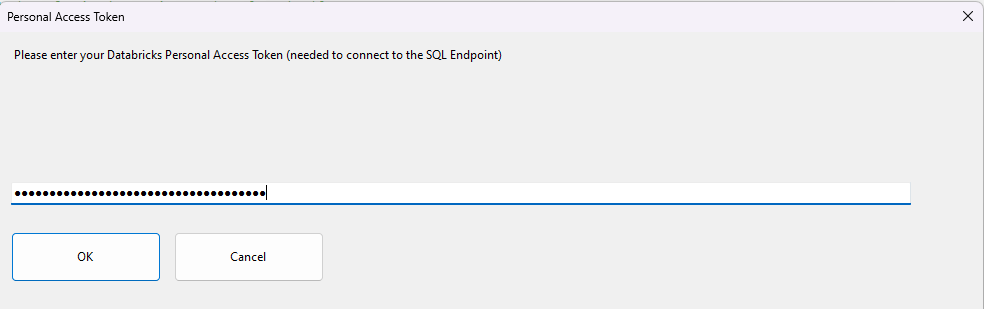
每次运行该脚本时,都会提示用户输入 Databricks 个人访问令牌。这用于对 Databricks 进行身份验证。该脚本会使用 Unity Catalog 中的 information_schema 表来检索关系信息,因此您可能需要再与 Databricks 管理员确认一下,确保您有权限查询这些表。
脚本
创建 Databricks 关系
/*
 * Title: Create Databricks Relationships
 * Author: Johnny Winter, greyskullanalytics.com
 *
 * This script, when executed, will loop through the currently selected tables and send a query to the Databricks Information Schema tables to see if any foreign keys
 * have been defined. Where foreign keys are identified, the script will create relationships between the tables in the semantic model.
 * With the exception of dimension columns that are datetime type, key columns will be hidden once relationshsips are created, with primary keys marked as primary keys and IsAvailableInMDX set to false.
 * Step 1:  Select one or more tables in the model. These should be tables which have a foreign key relationship defined in Unity Catalog
            (typically fact tables, but they could also be bridge tables or outrigger dimensions).
 * Step 2:  Run this script
 * Step 3:  Enter your Databricks Personal Access Token when prompted
 * Step 4:  The script will connect to Databricks and detect where foreign keys exist on the selected table.
            If the relationship does not already exist in the semantic model, it will be created.
            If a relationship already exists between the two tables, the new relationship will be created as inactive
            For each table processed, a message box will display the number of relationships created.
 *          Click OK to continue to the next table.
 * Notes:
 *  -   This script requires the Databricks ODBC Driver (recommended) or legacy Simba Spark ODBC Driver to be installed (download from https://www.databricks.com/spark/odbc-drivers-download)
 *  -   The script auto-detects which driver is installed
 *  -   Each run of the script will prompt the user for a Databricks Personal Access Token
 */
#r "Microsoft.VisualBasic"
using System;
using System.Data.Odbc;
using System.Drawing;
using System.Text.RegularExpressions;
using System.Windows.Forms;
using Microsoft.VisualBasic;
using sysData = System.Data;

//code to create a masked input box for Databricks PAT token
public partial class PasswordInputForm : Form
{
    public string Password { get; private set; }

    private TextBox passwordTextBox;
    private Button okButton;
    private Button cancelButton;
    private Label promptLabel;

    public PasswordInputForm(string prompt, string title)
    {
        InitializeComponent(prompt, title);
    }

    private void InitializeComponent(string prompt, string title)
    {
        this.Text = title;
        this.Size = new System.Drawing.Size(4000, 1500);
        this.StartPosition = FormStartPosition.WindowsDefaultLocation;
        this.FormBorderStyle = FormBorderStyle.FixedDialog;
        this.MaximizeBox = false;
        this.MinimizeBox = false;

        // Prompt label
        promptLabel = new Label();
        promptLabel.Text = prompt;
        promptLabel.Location = new System.Drawing.Point(12, 15);
        promptLabel.Size = new System.Drawing.Size(360, 40);
        promptLabel.AutoSize = false;
        this.Controls.Add(promptLabel);

        // Password textbox
        passwordTextBox = new TextBox();
        passwordTextBox.Location = new System.Drawing.Point(12, 55);
        passwordTextBox.Size = new System.Drawing.Size(360, 20);
        passwordTextBox.UseSystemPasswordChar = true; // This masks the input
        passwordTextBox.KeyPress += (s, e) =>
        {
            if (e.KeyChar == (char)Keys.Return)
            {
                OkButton_Click(null, null);
                e.Handled = true;
            }
        };
        this.Controls.Add(passwordTextBox);

        // OK button
        okButton = new Button();
        okButton.Text = "OK";
        okButton.Location = new System.Drawing.Point(216, 85);
        okButton.Size = new System.Drawing.Size(150, 50);
        okButton.Click += OkButton_Click;
        this.Controls.Add(okButton);

        // Cancel button
        cancelButton = new Button();
        cancelButton.Text = "Cancel";
        cancelButton.Location = new System.Drawing.Point(297, 85);
        cancelButton.Size = new System.Drawing.Size(150, 50);
        cancelButton.Click += CancelButton_Click;
        this.Controls.Add(cancelButton);

        // Set default and cancel buttons
        this.AcceptButton = okButton;
        this.CancelButton = cancelButton;

        // Focus on textbox when form loads
        this.Load += (s, e) => passwordTextBox.Focus();
    }

    private void OkButton_Click(object sender, EventArgs e)
    {
        Password = passwordTextBox.Text;
        this.DialogResult = DialogResult.OK;
        this.Close();
    }

    private void CancelButton_Click(object sender, EventArgs e)
    {
        Password = string.Empty;
        this.DialogResult = DialogResult.Cancel;
        this.Close();
    }

    public static string ShowDialog(string prompt, string title)
    {
        using (var form = new PasswordInputForm(prompt, title))
        {
            if (form.ShowDialog() == DialogResult.OK)
                return form.Password;
            return string.Empty;
        }
    }
}

public static class MaskedInputHelper
{
    public static string GetMaskedInput(string prompt, string title, string defaultValue = "")
    {
        using (var form = new Form())
        {
            form.Text = title;
            form.Size = new System.Drawing.Size(1000, 500);
            form.StartPosition = FormStartPosition.CenterScreen;
            form.FormBorderStyle = FormBorderStyle.FixedDialog;
            form.MaximizeBox = false;
            form.MinimizeBox = false;

            var label = new Label()
            {
                Left = 12,
                Top = 15,
                Size = new System.Drawing.Size(900, 100),
                Text = prompt,
            };
            var textBox = new TextBox()
            {
                Left = 12,
                Top = 150,
                Size = new System.Drawing.Size(900, 100),
                UseSystemPasswordChar = true,
                Text = defaultValue,
            };
            var buttonOk = new Button()
            {
                Text = "OK",
                Size = new System.Drawing.Size(150, 50),
                Left = 12,
                Width = 150,
                Top = 200,
                DialogResult = DialogResult.OK,
            };
            var buttonCancel = new Button()
            {
                Text = "Cancel",
                Size = new System.Drawing.Size(150, 50),
                Left = 175,
                Width = 150,
                Top = 200,
                DialogResult = DialogResult.Cancel,
            };

            buttonOk.Click += (sender, e) =>
            {
                form.Close();
            };
            form.Controls.Add(label);
            form.Controls.Add(textBox);
            form.Controls.Add(buttonOk);
            form.Controls.Add(buttonCancel);
            form.AcceptButton = buttonOk;
            form.CancelButton = buttonCancel;

            return form.ShowDialog() == DialogResult.OK ? textBox.Text : string.Empty;
        }
    }
}

//Code to retrieve Databricks Connection information from the M Query in a table partition
public class DatabricksConnectionInfo
{
    public string ServerHostname { get; set; }
    public string HttpPath { get; set; }
    public string DatabaseName { get; set; }
    public string SchemaName { get; set; }
    public string TableName { get; set; }

    public override string ToString()
    {
        return $"Server: {ServerHostname}\n"
            + $"HTTP Path: {HttpPath}\n"
            + $"Database: {DatabaseName}\n"
            + $"Schema: {SchemaName}\n"
            + $"Table: {TableName}";
    }
}

public class PowerQueryMParser
{
    public static DatabricksConnectionInfo ParseMQuery(string mQuery)
    {
        if (string.IsNullOrWhiteSpace(mQuery))
            throw new ArgumentException("M query cannot be null or empty");

        var connectionInfo = new DatabricksConnectionInfo();

        try
        {
            // Parse Source line to extract server hostname and HTTP path
            ParseSourceLine(mQuery, connectionInfo);

            // Parse Database line to extract database name
            ParseDatabaseLine(mQuery, connectionInfo);

            // Parse Schema line to extract schema name
            ParseSchemaLine(mQuery, connectionInfo);

            // Parse Data line to extract table name
            ParseDataLine(mQuery, connectionInfo);

            return connectionInfo;
        }
        catch (Exception ex)
        {
            throw new InvalidOperationException($"Error parsing M query: {ex.Message}", ex);
        }
    }

    private static void ParseSourceLine(string mQuery, DatabricksConnectionInfo connectionInfo)
    {
        // Pattern to match both:
        // Source = DatabricksMultiCloud.Catalogs("hostname", "httppath", null),
        // Source = Databricks.Catalogs("hostname", "httppath", null),
        var sourcePattern =
            @"Source\s*=\s*Databricks(?:MultiCloud)?\.Catalogs\s*\(\s*""([^""]+)""\s*,\s*""([^""]+)""\s*,\s*null\s*\)";
        var sourceMatch = Regex.Match(
            mQuery,
            sourcePattern,
            RegexOptions.IgnoreCase | RegexOptions.Multiline
        );

        if (!sourceMatch.Success)
            throw new FormatException(
                "Could not find valid Source definition in M query (supports both Databricks and DatabricksMultiCloud connectors)"
            );

        connectionInfo.ServerHostname = sourceMatch.Groups[1].Value;
        connectionInfo.HttpPath = sourceMatch.Groups[2].Value;
    }

    private static void ParseDatabaseLine(string mQuery, DatabricksConnectionInfo connectionInfo)
    {
        // Pattern to match: Database = Source{[Name="databasename",Kind="Database"]}[Data],
        var databasePattern =
            @"Database\s*=\s*Source\s*{\s*\[\s*Name\s*=\s*""([^""]+)""\s*,\s*Kind\s*=\s*""Database""\s*\]\s*}\s*\[\s*Data\s*\]";
        var databaseMatch = Regex.Match(
            mQuery,
            databasePattern,
            RegexOptions.IgnoreCase | RegexOptions.Multiline
        );

        if (!databaseMatch.Success)
            throw new FormatException("Could not find valid Database definition in M query");

        connectionInfo.DatabaseName = databaseMatch.Groups[1].Value;
    }

    private static void ParseSchemaLine(string mQuery, DatabricksConnectionInfo connectionInfo)
    {
        // Pattern to match: Schema = Database{[Name="schemaname",Kind="Schema"]}[Data],
        var schemaPattern =
            @"Schema\s*=\s*Database\s*{\s*\[\s*Name\s*=\s*""([^""]+)""\s*,\s*Kind\s*=\s*""Schema""\s*\]\s*}\s*\[\s*Data\s*\]";
        var schemaMatch = Regex.Match(
            mQuery,
            schemaPattern,
            RegexOptions.IgnoreCase | RegexOptions.Multiline
        );

        if (!schemaMatch.Success)
            throw new FormatException("Could not find valid Schema definition in M query");

        connectionInfo.SchemaName = schemaMatch.Groups[1].Value;
    }

    private static void ParseDataLine(string mQuery, DatabricksConnectionInfo connectionInfo)
    {
        // Pattern to match: Data = Schema{[Name="tablename",Kind="Table"]}[Data]
        var dataPattern =
            @"Data\s*=\s*Schema\s*{\s*\[\s*Name\s*=\s*""([^""]+)""\s*,\s*Kind\s*=\s*""Table""\s*\]\s*}\s*\[\s*Data\s*\]";
        var dataMatch = Regex.Match(
            mQuery,
            dataPattern,
            RegexOptions.IgnoreCase | RegexOptions.Multiline
        );

        if (!dataMatch.Success)
            throw new FormatException("Could not find valid Data definition in M query");

        connectionInfo.TableName = dataMatch.Groups[1].Value;
    }
}

////////////////////////////////////////////////////////////////////////////////////////////////////////////////////////////////////////
//main script


//check that user has a table selected
if (Selected.Tables.Count == 0)
{
    // toggle the 'Running Macro' spinbox
    ScriptHelper.WaitFormVisible = false;
    Interaction.MsgBox("Select one or more tables", MsgBoxStyle.Critical, "Table Required");
    return;
}

//prompt for personal access token - required to authenticate to Databricks
string dbxPAT;
do
{
    // toggle the 'Running Macro' spinbox
    ScriptHelper.WaitFormVisible = false;
    dbxPAT = MaskedInputHelper.GetMaskedInput(
        "Please enter your Databricks Personal Access Token (needed to connect to the SQL Endpoint)",
        "Personal Access Token"
    );

    if (string.IsNullOrEmpty(dbxPAT))
    {
        return; // User cancelled
    }

    if (string.IsNullOrWhiteSpace(dbxPAT))
    {
        MessageBox.Show(
            "Personal Access Token required",
            "Personal Access Token required",
            MessageBoxButtons.OK,
            MessageBoxIcon.Warning
        );
    }
} while (string.IsNullOrWhiteSpace(dbxPAT));

// toggle the 'Running Macro' spinbox
ScriptHelper.WaitFormVisible = true;

// auto-detect Databricks ODBC driver
string driverPath;
string newDriverPath = @"C:\Program Files\Databricks ODBC Driver";
string legacyDriverPath = @"C:\Program Files\Simba Spark ODBC Driver";

if (System.IO.Directory.Exists(newDriverPath))
{
    driverPath = newDriverPath;
}
else if (System.IO.Directory.Exists(legacyDriverPath))
{
    driverPath = legacyDriverPath;
}
else
{
    ScriptHelper.WaitFormVisible = false;
    Interaction.MsgBox(
        @"No Databricks ODBC driver found.

Please install the Databricks ODBC Driver from:
https://www.databricks.com/spark/odbc-drivers-download

Expected installation paths:
  " + newDriverPath + @"
  " + legacyDriverPath,
        MsgBoxStyle.Critical,
        "ODBC Driver Not Found"
    );
    return;
}

//for each selected table, get the Databricks connection info from the partition info
foreach (var t in Selected.Tables)
{
    string mQuery = t.Partitions[t.Name].Expression;
    var connectionInfo = PowerQueryMParser.ParseMQuery(mQuery);
    var rels = 0;
    // Access individual components
    string serverHostname = connectionInfo.ServerHostname;
    string httpPath = connectionInfo.HttpPath;
    string databaseName = connectionInfo.DatabaseName;
    string schemaName = connectionInfo.SchemaName;
    string tableName = connectionInfo.TableName;

    //use this query to see if any primary/foreign key relationships have been defined in Unity Catalog
    var query =
        @"
        SELECT
            fk.table_catalog AS fk_table_catalog,
            fk.table_schema AS fk_table_schema,
            fk.table_name AS fk_table_name,
            fk.column_name AS fk_column,
            pk.table_catalog AS pk_table_catalog,
            pk. table_schema AS pk_table_schema,
            pk.table_name AS pk_table_name,
            pk.column_name AS pk_column
        FROM
            "
        + databaseName
        + @".information_schema.key_column_usage fk
            INNER JOIN "
        + databaseName
        + @".information_schema.referential_constraints rc
                ON fk.constraint_catalog = rc.constraint_catalog
                AND fk.constraint_schema = rc.constraint_schema
                AND fk.constraint_name = rc.constraint_name
            INNER JOIN "
        + databaseName
        + @".information_schema.key_column_usage pk
                ON rc.unique_constraint_catalog = pk.constraint_catalog
                AND rc.unique_constraint_schema = pk.constraint_schema
            AND rc.unique_constraint_name = pk.constraint_name
        WHERE
            fk.table_schema = '"
        + schemaName
        + @"'
            AND fk.table_name = '"
        + tableName
        + @"'
        AND fk.position_in_unique_constraint = 1
";

    //set DBX connection string
    var odbcConnStr =
        @"Driver=" + driverPath + ";Host="
        + serverHostname
        + ";Port=443;HTTPPath="
        + httpPath
        + ";SSL=1;ThriftTransport=2;AuthMech=3;UID=token;PWD="
        + dbxPAT;

    //test connection
    OdbcConnection conn = new OdbcConnection(odbcConnStr);
    try
    {
        conn.Open();
    }
    catch
    {
        // toggle the 'Running Macro' spinbox
        ScriptHelper.WaitFormVisible = false;
        Interaction.MsgBox(
            @"Connection failed (using driver: " + driverPath + @")

Please check the following prerequisites:

- you must have the Databricks ODBC Driver installed
(download from https://www.databricks.com/spark/odbc-drivers-download)

- check that the Databricks server name "
                + serverHostname
                + @" is correct

- check that the Databricks SQL endpoint / HTTP Path "
                + httpPath
                + @" is correct

- check that you have used a valid Personal Access Token",
            MsgBoxStyle.Critical,
            "Connection Error"
        );
        return;
    }

    //send query
    OdbcDataAdapter da = new OdbcDataAdapter(query, conn);
    var dbxRelationships = new sysData.DataTable();

    try
    {
        da.Fill(dbxRelationships);
    }
    catch
    {
        // toggle the 'Running Macro' spinbox
        ScriptHelper.WaitFormVisible = false;
        Interaction.MsgBox(
            @"Connection failed

    Either:
        - the table "
                + schemaName
                + "."
                + tableName
                + " does not exist"
                + @"

        - you do not have permissions to query this table

        - the connection timed out. Please check that the SQL Endpoint cluster is running",
            MsgBoxStyle.Critical,
            "Connection Error"
        );
        return;
    }

    //for every table in the model, see if it matches a row in the Databricks query
    foreach (var dt in Model.Tables)
    {
        //get the source table information
        string sourceMQuery = dt.Partitions[dt.Name].Expression;
        var sourceConnectionInfo = PowerQueryMParser.ParseMQuery(sourceMQuery);
        // Access individual components
        string sourceSchemaName = sourceConnectionInfo.SchemaName;
        string sourceTableName = sourceConnectionInfo.TableName;

        foreach (sysData.DataRow row in dbxRelationships.Rows)
        {
            if (
                string.Equals(
                    sourceSchemaName + "." + sourceTableName,
                    row["pk_table_schema"].ToString() + "." + row["pk_table_name"].ToString(),
                    StringComparison.OrdinalIgnoreCase
                )
            )
            {
                var dimTable = dt;
                foreach (var dc in dt.DataColumns)
                    if (dc.SourceColumn == row["pk_column"].ToString())
                    {
                        var dimColumn = dc;

                        foreach (var fc in t.DataColumns)
                            if (fc.SourceColumn == row["fk_column"].ToString())
                            {
                                var factColumn = fc;

                                // Check whether a relationship already exists between the two columns:
                                if (
                                    !Model.Relationships.Any(r =>
                                        r.FromColumn == factColumn && r.ToColumn == dimColumn
                                    )
                                )
                                {
                                    // If relationships already exists between the two tables, new relationships will be created as inactive:
                                    var makeInactive = Model.Relationships.Any(r =>
                                        r.FromTable == t && r.ToTable == dimTable
                                    );

                                    // Add the new relationship:
                                    var rel = Model.AddRelationship();
                                    rel.FromColumn = factColumn;
                                    rel.ToColumn = dimColumn;
                                    factColumn.IsHidden = true;
                                    factColumn.IsAvailableInMDX = false;
                                    dimColumn.IsKey = true;
                                    if (dc.DataType != DataType.DateTime)
                                    {
                                        dimColumn.IsHidden = true;
                                        dimColumn.IsAvailableInMDX = false;
                                    }

                                    if (makeInactive)
                                        rel.IsActive = false;
                                    rels = rels + 1;
                                }
                            }
                    }
            }
        }
    }
    // toggle the 'Running Macro' spinbox
    ScriptHelper.WaitFormVisible = false;
    Interaction.MsgBox(
        rels + " relationships added to " + t.Name,
        MsgBoxStyle.Information,
        "Add relationships"
    );
    // toggle the 'Running Macro' spinbox
    ScriptHelper.WaitFormVisible = true;
    conn.Close();
}
说明
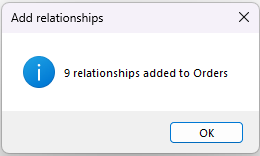
脚本使用 WinForms 来提示输入 Databricks 个人访问令牌,用于对 Databricks 进行身份验证。它会自动检测已安装的是新版 Databricks ODBC Driver 还是旧版 Simba Spark ODBC Driver。对于每个选中的表,脚本会从该表分区中的 M 查询获取 Databricks 连接字符串信息,以及 schema 和表名。随后,它会使用检测到的 ODBC 驱动程序向 Databricks 发送一条 SQL 查询,通过查询 information_schema 表来查找在 Unity Catalog 中为该表定义的任何外键关系。对于 SQL 查询返回的每一行,脚本都会在模型中查找匹配的表名和列名;如果尚未存在关系,则会创建一个新的关系。对于角色扮演维度,同一张表可能通过多个外键关联到同一目标表,脚本检测到的第一个关系将被设为活动关系,其他随后创建的关系均设为非活动。脚本还会隐藏主键和外键,并将 IsAvailableInMDX 设为 false(DateTime 类型的主键除外)。主键也会在语义模型中标记为 IsKey = TRUE。脚本对所有选定表都运行完成后,会弹出一个对话框,显示新创建了多少个关系。
示例输出