在度量值中查找并替换子字符串
脚本用途
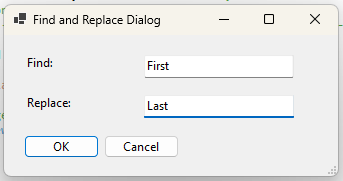
在模型的度量值 DAX 表达式中查找并替换子字符串。即例如,你想在多个度量值中将 'Customers'[Key Account] 替换为 'Products'[Type]。一个输入框让用户输入要查找的文本,另一个输入框让用户定义替换文本。
脚本
#r "System.Drawing"

using System.Drawing;
using System.Text.RegularExpressions;
using System.Windows.Forms;

// Hide the 'Running Macro' spinbox
ScriptHelper.WaitFormVisible = false;

// Replace Selected.Measures with Model.AllMeasures to scan all measures
var _measures = Model.AllMeasures;
    // Optional: Replace _m.Expression with _m.Name to find & replace in names.

// Initialize _find and _replace string variables
string _find = "Find";
string _replace = "Replace";

// WinForms prompt to get Find & Replace input
using (Form prompt = new Form())
{
    Font formFont = new Font("Segoe UI", 11);

    // Prompt config
    prompt.AutoSize = true;
    prompt.MinimumSize = new Size(350, 120);
    prompt.Text = "Find and Replace Dialog";
    prompt.StartPosition = FormStartPosition.CenterScreen;

    // Set the AutoScaleMode property to Dpi
    prompt.AutoScaleMode = AutoScaleMode.Dpi;

    // Find: label
    Label findLabel = new Label() { Text = "Find:" };
    findLabel.Location = new Point(20, 20);
    findLabel.Width = 80;
    findLabel.Font = formFont;

    // Textbox for inputing the substring text
    TextBox findBox = new TextBox();
    findBox.Width = 200;
    findBox.Location = new Point(findLabel.Location.X + findLabel.Width + 20, findLabel.Location.Y - 4);
    findBox.SelectedText = "Find this Text";
    findBox.Font = formFont;

    // Replace: label
    Label replaceLabel = new Label() { Left = 20, Top = 60, Text = "Replace:" };
    replaceLabel.Width = 80;
    replaceLabel.Font = formFont;

    // Textbox for inputting the substring text
    TextBox replaceBox = new TextBox() { Left = replaceLabel.Right + 20, Top = replaceLabel.Location.Y - 4, Width = findBox.Width };
    replaceBox.SelectedText = "Replace with this Text";
    replaceBox.Font = formFont;

    // OK Button
    Button okButton = new Button() { Text = "OK", Left = 20, Width = 75, Top = replaceBox.Location.Y + replaceBox.Height + 20 };
    okButton.MinimumSize = new Size(75, 25);
    okButton.AutoSize = true;
    okButton.Font = formFont;

    // Cancel Button
    Button cancelButton = new Button() { Text = "Cancel", Left = okButton.Location.X + okButton.Width + 10, Top = okButton.Location.Y };
    cancelButton.MinimumSize = new Size(75, 25);
    cancelButton.AutoSize = true;
    cancelButton.Font = formFont;

    // Button actions
    okButton.Click += (sender, e) => { _find = findBox.Text; _replace = replaceBox.Text; prompt.DialogResult = DialogResult.OK; };
    cancelButton.Click += (sender, e) => { prompt.DialogResult = DialogResult.Cancel; };

    prompt.AcceptButton = okButton;
    prompt.CancelButton = cancelButton;

    prompt.Controls.Add(findLabel);
    prompt.Controls.Add(findBox);
    prompt.Controls.Add(replaceLabel);
    prompt.Controls.Add(replaceBox);
    prompt.Controls.Add(okButton);
    prompt.Controls.Add(cancelButton);

    // The user clicked OK, so perform the find-and-replace logic
    if (prompt.ShowDialog() == DialogResult.OK)
        {

            int _occurrences = 0;
            var _ReplacedList = new List<string>();

            foreach (var _m in _measures)
                {
                    if (_m.Expression != _m.Expression.Replace(_find, _replace))
                        {
                            try
                                {
                                    // Count number of occurrences of _find substring in the string
                                    string _pattern = Regex.Escape(_find);
                                    _occurrences = Regex.Matches(_m.Expression, _pattern).Count;
                                }
                            catch
                                {
                                    // If it's not found there are 0 occurrences
                                    _occurrences = 0;
                                }

                            // Perform the Find/Replace
                            _m.Expression = _m.Expression.Replace(_find, _replace);
                            _ReplacedList.Add(_m.DaxObjectName);
                        }
                }

            // Create a list of all the measures replaced
            string _Replaced = _ReplacedList.Count > 0
                ? "\n\nMeasures with Replacements:\n • " + string.Join("\n • ", _ReplacedList)
                : "";

            // Return a success Info box pop-up
            Info(
                "Replaced " +
                _occurrences +
                " occurrences of '" +
                _find +
                "' with '" +
                _replace +
                "'" +
                _Replaced);
        }
    else
        {
            Error("Find/Replace cancelled!");
        }
}
说明
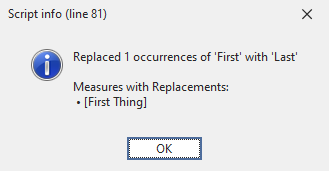
此代码片段会使用 WinForms 创建一个弹出对话框,让你输入要在所选度量值中搜索的子字符串,并将其替换为另一个子字符串。成功提示框会告知你查找/替换已成功完成。
示例输出