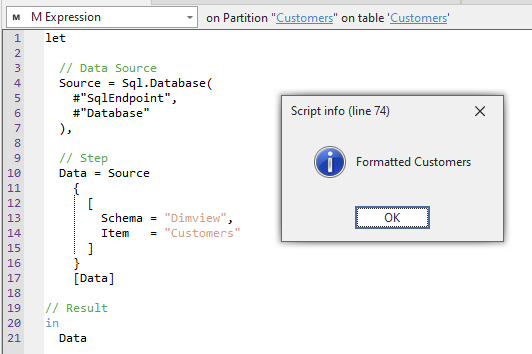
格式化 Power Query
脚本用途
如果您想对复杂的 Power Query 进行格式化,使其更易阅读、也更方便修改。
Note
此脚本会将您的 Power Query M 代码发送到 Power Query Formatter API。使用此脚本格式化 Power Query 代码时,请确保以负责任且合规的方式使用,并遵守相关要求。
脚本
格式化 Power Query
// This script formats the Power Query (M Code) of any selected M Partition (not Shared Expression or Source Expression).
// It will send an HTTPS POST request of the expression to the Power Query Formatter API and replace the code with the result.
//
using System.Net.Http;
using System.Net.Http.Headers;
using System.Text;
using Newtonsoft.Json;
using Newtonsoft.Json.Linq;

// URL of the powerqueryformatter.com API
string powerqueryformatterAPI = "https://m-formatter.azurewebsites.net/api/v2";

// HttpClient method to initiate the API call POST method for the URL
HttpClient client = new HttpClient();
HttpRequestMessage request = new HttpRequestMessage(HttpMethod.Post, powerqueryformatterAPI);

// Get the M Expression of the selected partition
string partitionExpression = Selected.Partition.Expression;

// Serialize the request body as a JSON object
var requestBody = JsonConvert.SerializeObject(
    new {
        code = partitionExpression,
        resultType = "text",
        lineWidth = 40,
        alignLineCommentsToPosition = true,
        includeComments = true
    });

// Set the "Content-Type" header of the request to "application/json" and the encoding to UTF-8
var content = new StringContent(requestBody, Encoding.UTF8, "application/json");
content.Headers.ContentType = new MediaTypeHeaderValue("application/json");

// Retrieve the response
var response = client.PostAsync(powerqueryformatterAPI, content).Result;

// If the response is successful
if (response.IsSuccessStatusCode)
{
    // Get the result of the response
    var result = response.Content.ReadAsStringAsync().Result;

    // Parse the response JSON object from the string
    JObject data = JObject.Parse(result.ToString());

    // Get the formatted Power Query response
    string formattedPowerQuery = (string)data["result"];

    ///////////////////////////////////////////////////////////////////////
    // OPTIONAL MANUAL FORMATTING
    // Manually add a new line and comment to each step
    var replace = new Dictionary<string, string>
    {
        { " //", "\n\n//" },
        { "\n  #", "\n\n  // Step\n  #" },
        { "\n  Source", "\n\n  // Data Source\n  Source" },
        { "\n  Dataflow", "\n\n  // Dataflow Connection Info\n  Dataflow" },
        {"\n  Data =", "\n\n  // Step\n  Data ="},
        {"\n  Navigation =", "\n\n  // Step\n  Navigation ="},
        {"in\n\n  // Step\n  #", "in\n  #"},
        {"\nin", "\n\n// Result\nin"}
    };

    // Replace the first string in the dictionary with the second
    var manuallyformattedPowerQuery = replace.Aggregate(
        formattedPowerQuery,
        (before, after) => before.Replace(after.Key, after.Value));

    // Replace the auto-formatted code with the manually formatted version
    formattedPowerQuery = manuallyformattedPowerQuery;
    ////////////////////////////////////////////////////////////////////////

    // Replace the unformatted M expression with the formatted expression
    Selected.Partition.Expression = formattedPowerQuery;

    // Pop-up to inform of completion
    Info("Formatted " + Selected.Partition.Name);
}

// Otherwise return an error message
else
{
Info(
    "API call unsuccessful." +
    "\nCheck that you are selecting a partition with a valid M Expression."
    );
}
说明
此代码片段会将 M 分区中的 Power Query 以 HTTP POST 请求发送到 Power Query Formatter。同时还做了一些手动格式化,让代码更易读。
输出示例