配置增量刷新
脚本用途
如果你想基于某个特定的日期字段为导入表配置增量刷新。此脚本适用于你希望配置增量刷新的 datetime、date 或 integer 日期列。
要使用此脚本,请在要配置增量刷新的表中选中日期列,然后运行脚本。仅当你尚未创建 #"RangeStart" 和 #"RangeEnd" 参数,并且所选表尚未配置刷新策略时,脚本才会运行。
Note
此脚本会自动修改该表的 M 分区,以添加筛选步骤。请务必检查是否已正确完成。
如果你有很多步骤,务必将此步骤移动到可以折叠到数据源的位置。请确保在 Power Query 中调整所有 `#"Step References"
Note
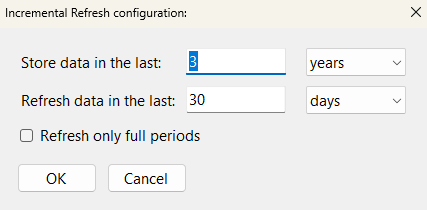
此脚本会使用用户输入来生成刷新策略。请确保在用户输入对话框中输入正确的值。
脚本
为所选列实现增量刷新
// This script will automatically generate an Incremental Refresh policy for a selected table
// It is generated based on the selected column
// It requires input from the user with a dialogue pop-up box.
// This script will automatically generate an Incremental Refresh policy for a selected table
// It is generated based on the selected column
// It requires input from the user with a dialogue pop-up box.
using System.Drawing;
using System.Windows.Forms;

// Hide the 'Running Macro' spinbox
ScriptHelper.WaitFormVisible = false;

// Initialize Variables
Table _Table                = Model.Tables[0];
string _MExpression         = "";
Column _Column              = Model.AllColumns.ToList()[0];
string _ColumnName          = "";
DataType _ColumnDataType    = DataType.DateTime;

try
    {
        // Select a Table for which you will configure Incremental Refresh.
        // The Refresh Policy will be enabled and configured for this table.
        _Table =
            Model.Tables.Where(

                // Exclude tables that already have a refresh policy
                t =>
                t.EnableRefreshPolicy != true &&

                // Include only 'Table' objects
                t.ObjectType == ObjectType.Table &&

                // Exclude Calculated Tables
                t.Columns[0].Type != ColumnType.CalculatedTableColumn &&

                // Only include tables that have a column on the "From" side of the relationship
                (Model.Relationships.Count() > 0 ?
                t.Columns.Any(c =>  Model.Relationships.Any(r => r.FromColumn == c) ) : true) &&

                // Exclude tables that don't have a DateTime or Integer column
                (
                    t.Columns.Any(c => c.DataType == DataType.DateTime) ||
                    t.Columns.Any(c => c.DataType == DataType.Int64)
                )
            ).SelectTable(null,"Select a Table for which you will configure Incremental Refresh:");

        _MExpression = _Table.Partitions[0].Expression;

    try
    {
        // Select the column to apply the Refresh Policy.
        // The M Expression will be modified using the name of this column.
        _Column =
            _Table.Columns.Where(

                // Include only DateTime or Int columns
                c =>
                c.DataType == DataType.DateTime ||
                c.DataType == DataType.Int64

            ).SelectColumn(null, "Select a DateTime or DateKey (Int) Column to apply the Refresh Policy.");

        _ColumnName = _Column.DaxObjectName;
        _ColumnDataType = _Column.DataType;

        try
        {   // Test if 'RangeStart' exists
            Model.Expressions.Contains(Model.Expressions["RangeStart"]);
            Info ("RangeStart already exists!");
        }
        catch
        {
            // Add RangeStart parameter
            Model.AddExpression(
                "RangeStart",
                @"
            #datetime(2023, 01, 01, 0, 0, 0) meta
            [
                IsParameterQuery = true,
                IsParameterQueryRequired = true,
                Type = type datetime
            ]"
            );

            // Success message for adding 'RangeStart'
            Info ( "Created 'RangeStart' M Parameter!" );
        }

        // Test if the RangeEnd parameter exists
        try
        {   // Test if 'RangeEnd' exists
            Model.Expressions.Contains(Model.Expressions["RangeEnd"]);
            Info ("RangeEnd already exists!");
        }
        catch
        {
            // Add RangeEnd parameter
            Model.AddExpression(
                "RangeEnd",
                @"
            #datetime(2023, 31, 01, 0, 0, 0) meta
            [
                IsParameterQuery = true,
                IsParameterQueryRequired = true,
                Type = type datetime
            ]"
            );

            // Success message for adding 'RangeEnd'
            Info ( "Created 'RangeEnd' M Parameter!" );

        }

        // Incremental Refresh Configuration
        // Input box config
        Font _fontConfig = new Font("Segoe UI", 11);

        // Label for how long data should be stored
        var storeDataLabel = new Label();
        storeDataLabel.Text = "Store data in the last:";
        storeDataLabel.Location = new Point(20, 20);
        storeDataLabel.AutoSize = true;
        storeDataLabel.Font = _fontConfig;

        // User input for how long data should be stored
        var storeDataTextBox = new TextBox();
        storeDataTextBox.Location = new Point(storeDataLabel.Location.X + TextRenderer.MeasureText(storeDataLabel.Text, storeDataLabel.Font).Width + 20, storeDataLabel.Location.Y);
        storeDataTextBox.Size = new Size(100, 20);
        storeDataTextBox.Text = "3";
        storeDataTextBox.Font = _fontConfig;

        // User selection for how long data should be stored (granularity)
        var storeDataComboBox = new ComboBox();
        storeDataComboBox.Location = new Point(storeDataTextBox.Location.X + storeDataTextBox.Width + 20, storeDataLabel.Location.Y);
        storeDataComboBox.Size = new Size(100, 20);
        storeDataComboBox.DropDownStyle = ComboBoxStyle.DropDownList;
        storeDataComboBox.Items.AddRange(new object[] { "days", "months", "quarters", "years" });
        storeDataComboBox.SelectedIndex = 3;
        storeDataComboBox.Font = _fontConfig;

        // Label for how much data should be refreshed
        var refreshDataLabel = new Label();
        refreshDataLabel.Text = "Refresh data in the last:";
        refreshDataLabel.Location = new Point(20, storeDataLabel.Location.Y + storeDataLabel.Height + 15);
        refreshDataLabel.AutoSize = true;
        refreshDataLabel.Font = _fontConfig;

        // User input for how much data should be refreshed
        var refreshDataTextBox = new TextBox();
        refreshDataTextBox.Location = new Point(storeDataTextBox.Location.X, refreshDataLabel.Location.Y);
        refreshDataTextBox.Size = new Size(100, 20);
        refreshDataTextBox.Text = "30";
        refreshDataTextBox.Font = _fontConfig;

        // User selection for how much data should be refreshed (Period)
        var refreshDataComboBox = new ComboBox();
        refreshDataComboBox.Location = new Point(storeDataComboBox.Location.X, refreshDataLabel.Location.Y);
        refreshDataComboBox.Size = new Size(100, 20);
        refreshDataComboBox.DropDownStyle = ComboBoxStyle.DropDownList;
        refreshDataComboBox.Items.AddRange(new object[] { "days", "months", "quarters", "years" });
        refreshDataComboBox.SelectedIndex = 0;
        refreshDataComboBox.Font = _fontConfig;

        // User input to refresh full periods or not
        var fullPeriodsCheckBox = new CheckBox();
        fullPeriodsCheckBox.Text = "Refresh only full periods";
        fullPeriodsCheckBox.Location = new Point(storeDataLabel.Location.X + 3, refreshDataLabel.Location.Y + refreshDataLabel.Height + 15);
        fullPeriodsCheckBox.AutoSize = true;
        fullPeriodsCheckBox.Font = _fontConfig;

        // Form OK button
        var okButton = new Button();
        okButton.Text = "OK";
        okButton.Location = new Point(storeDataLabel.Location.X, fullPeriodsCheckBox.Location.Y + fullPeriodsCheckBox.Height + 15);
        okButton.MinimumSize = new Size(80, 25);
        okButton.AutoSize = true;
        okButton.DialogResult = DialogResult.OK;
        okButton.Font = _fontConfig;

        // Form cancel button
        var cancelButton = new Button();
        cancelButton.Text = "Cancel";
        cancelButton.Location = new Point(okButton.Location.X + okButton.Width + 10, okButton.Location.Y);
        cancelButton.MinimumSize = new Size(80, 25);
        cancelButton.AutoSize = true;
        cancelButton.DialogResult = DialogResult.Cancel;
        cancelButton.Font = _fontConfig;

        // Adjust the Location of the storeDataLabel to align with the storeDataTextBox
        storeDataLabel.Location = new Point(storeDataLabel.Location.X, storeDataLabel.Location.Y + 4);
        refreshDataLabel.Location = new Point(refreshDataLabel.Location.X, refreshDataLabel.Location.Y + 4);

        // Form config
        var form = new Form();
        form.Text = "Incremental Refresh configuration:";
        form.AutoSize = true;
        form.MinimumSize = new Size(450, 0);
        form.FormBorderStyle = FormBorderStyle.FixedDialog;
        form.MaximizeBox = false;
        form.MinimizeBox = false;

        // Open the dialogue in the center of the screen
        form.StartPosition = FormStartPosition.CenterScreen;

        // Set the AutoScaleMode property to Dpi
        form.AutoScaleMode = AutoScaleMode.Dpi;

        // Add controls to form specified above
        form.Controls.Add(storeDataLabel);
        form.Controls.Add(storeDataTextBox);
        form.Controls.Add(storeDataComboBox);
        form.Controls.Add(refreshDataLabel);
        form.Controls.Add(refreshDataTextBox);
        form.Controls.Add(refreshDataComboBox);
        form.Controls.Add(fullPeriodsCheckBox);
        form.Controls.Add(okButton);
        form.Controls.Add(cancelButton);

        // Draw the form
        var result = form.ShowDialog();

        // Get the values of the user input if entered
        if (result == DialogResult.OK)
        {
            // Enables the refresh policy
            _Table.EnableRefreshPolicy = true;

            var storeDataValue = storeDataTextBox.Text;
            var storeDataComboBoxValue = storeDataComboBox.SelectedItem.ToString();
            var refreshDataValue = refreshDataTextBox.Text;
            var refreshDataComboBoxValue = refreshDataComboBox.SelectedItem.ToString();
            var fullPeriodsChecked = fullPeriodsCheckBox.Checked;

            // Display the input values in a message box
            var message = string.Format(
                "Store data in the last: {0} {1}" +
                "\nRefresh data in the last: {2} {3}" +
                "\nRefresh only full periods: {4}",
                storeDataTextBox.Text,
                storeDataComboBox.SelectedItem.ToString(),
                refreshDataTextBox.Text,
                refreshDataComboBox.SelectedItem.ToString(),
                fullPeriodsCheckBox.Checked);

            Info(message);

            // Convert StoreDataGranularity to correct TOM Property
            RefreshGranularityType StoreDataGranularity = RefreshGranularityType.Day;
            switch (storeDataComboBox.SelectedItem.ToString())
            {
                case "years":
                    StoreDataGranularity = RefreshGranularityType.Year;
                    break;

                case "quarters":
                    StoreDataGranularity = RefreshGranularityType.Quarter;
                    break;

                case "months":
                    StoreDataGranularity = RefreshGranularityType.Month;
                    break;

                case "days":
                    StoreDataGranularity = RefreshGranularityType.Day;
                    break;

                default:
                    Error("Bad selection for Incremental Granularity.");
                    break;
            }


            // Convert IncrementalGranularity to correct TOM Property
            RefreshGranularityType IncrementalPeriodGranularity = RefreshGranularityType.Year;
            switch (refreshDataComboBox.SelectedItem.ToString())
            {
                case "years":
                    IncrementalPeriodGranularity = RefreshGranularityType.Year;
                    break;

                case "quarters":
                    IncrementalPeriodGranularity = RefreshGranularityType.Quarter;
                    break;

                case "months":
                    IncrementalPeriodGranularity = RefreshGranularityType.Month;
                    break;

                case "days":
                    IncrementalPeriodGranularity = RefreshGranularityType.Day;
                    break;

                default:
                    Error ( "Bad selection for Incremental Granularity." );
                    break;
            }

            // Convert RefreshCompletePeriods checkbox to correct TOM property
            int RefreshCompletePeriods;
            if ( fullPeriodsCheckBox.Checked == true )
            {
            RefreshCompletePeriods = -1;
            }
            else
            {
            RefreshCompletePeriods = 0;
            }

            // Set incremental window: period to be refreshed
            _Table.IncrementalGranularity = IncrementalPeriodGranularity;

            // Default: 30 days - change # if you want
            _Table.IncrementalPeriods = Convert.ToInt16(refreshDataTextBox.Text);

            // Only refresh complete days. Change to 0 if you don't want.
            _Table.IncrementalPeriodsOffset = RefreshCompletePeriods;

            // Set rolling window: period to be archived
            // Granularity = day, can change to month, quarter, year...
            _Table.RollingWindowGranularity = StoreDataGranularity;

            // Keep data for 1 year. Includes 1 full year and current partial year
            //    i.e. if it is Nov 2023, keeps data from Jan 1, 2022.
            //    On Jan 1, 2024, it will drop 2022 automatically.
            _Table.RollingWindowPeriods = Convert.ToInt16(storeDataTextBox.Text);

            // If the selected date column is an integer of type YYYYMMDD...
            if ( _ColumnDataType == DataType.Int64 )
            {
                // Add DateTimeToInt Function
                var _DateTimeToInt =
                    Model.AddExpression(
                        "fxDateTimeToInt",
                        @"(x as datetime) => Date.Year(x) * 10000 + Date.Month(x) * 100 + Date.Day(x)"
            );

            _DateTimeToInt.SetAnnotation("PBI_ResultType", "Function");
            _DateTimeToInt.Kind = ExpressionKind.M;

            // Source expression obtained from the original M partition
            _Table.SourceExpression =

                // Gets expression before final "in" keyword
                _MExpression.Split("\nin")[0].TrimEnd() +

                // Adds comma and newline
                ",\n" +

                // Adds step called "Incremental Refresh" for filtering
                @"    #""Incremental Refresh"" = Table.SelectRows( " +

                // Gets name of last step (after "in" keyword)
                _MExpression.Split("\nin")[1].TrimStart() +

                // Adds 'each' keyword
                @", each " +

                // Bases incremental refresh on current column name
                _ColumnName +

                // Greater than or equal to RangeStart
                @" >= fxDateTimeToInt ( #""RangeStart"" ) and " +

                // and
                _ColumnName +

                // Less than RangeEnd
                @" < fxDateTimeToInt ( #""RangeEnd"" ) )" +

                // re-add 'in' keyword
                "\nin\n" +

                // Reference final step just added
                @"    #""Incremental Refresh""";
            }


            // Otherwise treat it like a normal date/datetime column
            else
            {
                // Source expression obtained from the original M partition
                _Table.SourceExpression =
                    // Gets expression before final "in" keyword
                    _MExpression.Split("\nin")[0].TrimEnd() +

                    // Adds comma and newline
                    ",\n" +

                    // Adds step called "Incremental Refresh" for filtering
                    @"    #""Incremental Refresh"" = Table.SelectRows( " +

                    // Gets name of last step (after "in" keyword)
                    _MExpression.Split("\nin")[1].TrimStart() +

                    // Adds 'each' keyword
                    @", each " +

                    // Bases incremental refresh on current column name
                    _ColumnName +

                    // Greater than or equal to RangeStart
                    @" >= Date.From ( #""RangeStart"" ) and " +

                    // and
                    _ColumnName +

                    // Less than RangeEnd
                    @" < Date.From ( #""RangeEnd"" ) )" +

                    // re-add 'in' keyword
                    "\nin\n" +

                    // Reference final step just added
                    @"    #""Incremental Refresh""";
            }

            // Success message for Refresh Policy configuration
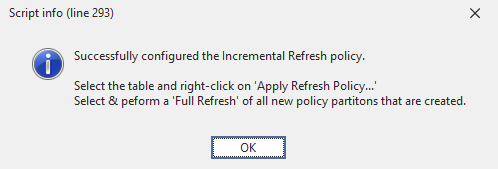
            Info (
                "Successfully configured the Incremental Refresh policy.\n" +
                "\nSelect the table and right-click on 'Apply Refresh Policy...'" +
                "\nSelect & peform a 'Full Refresh' of all new policy partitons that are created."
            );
            }
        else if (result == DialogResult.Cancel)
        {
            // if the user clicks the Cancel button, close the form and exit the script
            form.Close();
            Error ( "Cancelled configuration! Ending script without changes." );
            return;
        }
    }
    catch
    {
        Error( "No valid column selected! Ending script without changes." );
    }

}
catch
{
    Error( "No valid table selected! Ending script without changes." );
}
说明
此代码片段会基于所选日期列,在所选表中配置增量刷新。
示例输出