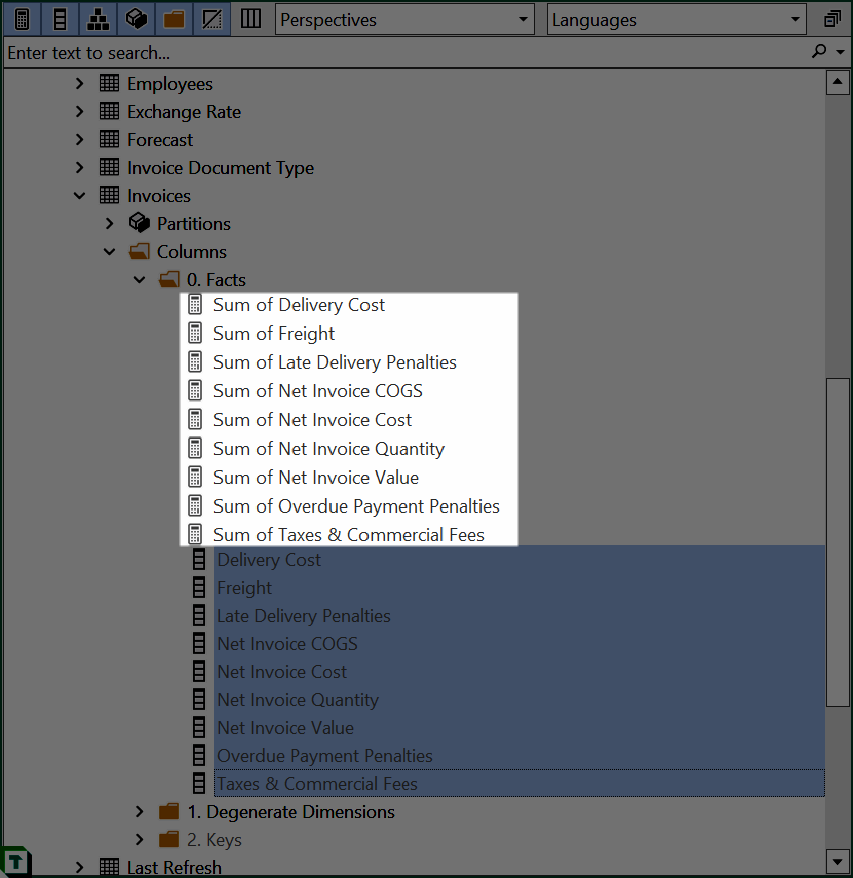
从列创建 SUM 度量值
脚本用途
如果您想快速为所选列批量创建使用 SUM 汇总的度量值,此脚本即可帮您完成。
脚本
从列创建度量值
// Creates a SUM measure for every currently selected column and hide the column.
foreach(var c in Selected.Columns)
{
    var newMeasure = c.Table.AddMeasure(
        "Sum of " + c.Name,                    // Name
        "SUM(" + c.DaxObjectFullName + ")",    // DAX expression
        c.DisplayFolder                        // Display Folder
    );

    // Set the format string on the new measure:
    newMeasure.FormatString = "0.00";

    // Provide some documentation:
    newMeasure.Description = "This measure is the sum of column " + c.DaxObjectFullName;

    // Hide the base column:
    c.IsHidden = true;
}
说明
这个片段使用 <Table>.AddMeasure(<name>, <expression>, <displayFolder>) 函数,在表中创建一个新的度量值。我们使用 DaxObjectFullName 属性获取列的完全限定名称,用于 DAX 表达式:'TableName'[ColumnName]。
输出示例