Direct Lake 语义模型
SQL 语义模型上的 Direct Lake 可通过 SQL 端点直接连接到存储在 Fabric 中的 OneLake 中的数据源。
Important
自 Tabular Editor 3.22.0 起,Tabular Editor 3 支持在 OneLake 上使用 Direct Lake,且在大多数情况下建议采用此方式。更多信息请参阅我们的 Direct Lake 指南。
Tabular Editor 3 可以创建并连接此类模型。有关本主题的教程,请参阅我们的博客文章:Direct Lake 语义模型:如何在 Tabular Editor 中使用它们。 Tabular Editor 3 可以通过 Lakehouse 和 Warehouse SQL Endpoint 创建 Direct Lake 语义模型。
Tabular Editor 2 可以连接到 Direct Lake 语义模型,但不提供用于创建新表或 Direct Lake 语义模型的内置功能。这需要手动完成,或使用 C# Script 来实现。
Note
Direct Lake 的限制 Direct Lake 模型可进行的更改存在一些限制。有关完整列表,请参阅 Direct Lake 的注意事项和限制。另见 SQLBI 的这篇文章,了解如何在 Direct Lake 和导入模式之间做出选择。
在 Tabular Editor 3 中创建基于 SQL 的 Direct Lake 模型
在 Tabular Editor 3(3.15.0 或更高版本)中创建基于 SQL 的 Direct Lake 模型时,需要在创建模型时于 New Model 对话框中勾选 Direct Lake 复选框进行指定。
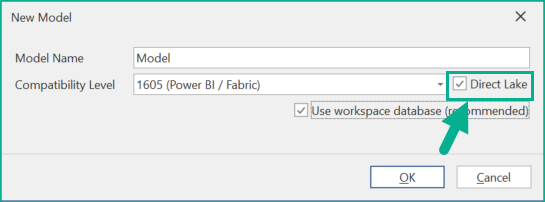
使用该复选框可确保设置 Direct Lake 特有的属性与注释,并将表的导入限制为 Direct Lake 支持的数据源。
Note
基于 SQL 的 Direct Lake 模型当前使用的排序规则与常规 Power BI 导入语义模型不同。这可能会导致在查询模型或在 DAX 代码中引用对象名称时得到不同的结果。更多信息见 Kurt Buhler 的这篇博文:Power BI 中区分大小写的模型:影响与注意事项。
Important
从 Tabular Editor 3.22.0 开始,“新建模型”对话框中已移除 Direct Lake 复选框。如果在 SQL 上使用 Direct Lake,你必须手动将模型的排序规则设置为与 Fabric Warehouse 的排序规则一致。
为新模型和表导入设定框架
Tabular Editor 3(3.15.0 或更高版本)会在首次部署时自动对模型执行框架化(刷新)。这是为了确保启用 Direct Lake 模式;否则模型会自动回退到 DirectQuery。
此外,在导入新表后,Tabular Editor 3(3.15.0 或更高版本)会在你下次保存模型时对模型进行 framing(刷新)。该首选项位于 Tools > Preferences > Model Deployment > Data Refresh 下。
识别 Direct Lake 模型
Tabular Editor 顶部的标题栏会显示该 Tabular Editor 实例中当前打开的是哪种类型的模型。此外,TOM Explorer 会显示每张表的类型和模式(Import、DirectQuery、Dual 或 Direct Lake)。如果模型混用了多种表模式,标题栏将显示“混合”。目前,Direct Lake on SQL 模型无法包含处于 Import、DirectQuery 或 Dual 模式的表。
将 Direct Lake 模型转换为导入模式
下面的 C# Script 会将现有模型转换为导入模式。如果你的模型对数据延迟的要求不高,无需 Direct Lake,或者你想避开 Direct Lake 模型的限制,但已经在 Fabric 中开始构建 Direct Lake 模型,那么这会很有用。
当 Tabular Editor 通过 XMLA endpoint 连接到语义模型后,即可运行该脚本。不过,Microsoft 不支持直接将更改保存回 Power BI/Fabric Workspace。为规避这一限制,建议使用“Model > Deploy...”选项。这样就可以将新转换的模型作为 Workspace 中的一个新实体进行部署。
Note
部署新转换的导入模式模型后,你需要指定用于访问 Lakehouse 的凭据,才能将数据刷新到模型中。
将 Direct Lake 模型转换为导入模式的 C# Script
// **********************************************************************************
// Convert Direct Lake-mode model to Import-mode
// ---------------------------------------------
//
// When this script is executed on a semantic model, it will:
//
//   - Loop through all tables. Any table that contains exactly 1 partition, which
//     is in Direct Lake mode, will have its partition replaced by an equivalent
//     Import-mode partition.
//   - Set the collation of the model to null (default)
//
// Remarks:
//
//   - The Import-mode partitions will use the SQL endpoint of the Lakehouse.
//   - The script assumes that the Shared Expression which specifies the SQL endpoint
//     is called "DatabaseQuery".
//   - Because TE2 does not expose the "SchemaName" property on EntityPartition
//     objects, we have to use reflection to access the underlying TOM objects.
//
// Compatibility:
// TE2.x, TE3.x
// **********************************************************************************

using System.Reflection;

const string mImportTemplate =
@"let
    Source = DatabaseQuery,
    Data = Source{{[Schema=""{0}"",Item=""{1}""]}}[Data]
in
    Data";

foreach(var table in Model.Tables)
{
    // Direct Lake-mode tables only have 1 partition...
    if(table.Partitions.Count != 1) continue;

    // ...which should be in "DirectLake" mode:
    var partition = table.Partitions[0];
    if(partition.Mode != ModeType.DirectLake) continue;

    // Tabular Editor unfortunately doesn't expose the SchemaName property of EntityPartitionSources,
    // so we'll have to use reflection to access the underlying TOM object.
    var pMetadataObjct = typeof(Partition).GetProperty("MetadataObject", BindingFlags.Instance | BindingFlags.NonPublic | BindingFlags.DeclaredOnly);
    var tomPartition = pMetadataObjct.GetValue(partition) as Microsoft.AnalysisServices.Tabular.Partition;
    var tomPartitionSource = tomPartition.Source as Microsoft.AnalysisServices.Tabular.EntityPartitionSource;

    // Table does not have an EntityPartitionSource, meaning it is not a Direct Lake table
    // (shouldn't happen, since we already checked for DirectLake mode above...)
    if(tomPartitionSource == null) continue;

    var schemaName = tomPartitionSource.SchemaName;
    var tableName = tomPartitionSource.EntityName;

    // Rename the original (Direct Lake) partition (as we can't have two partitions with the same name):
    var partitionName = partition.Name;
    partition.Name += "_old";

    // Add the new (Import) partition:
    table.AddMPartition(partitionName, string.Format(mImportTemplate, schemaName, tableName));

    // Delete the old (Direct Lake) partition):
    partition.Delete();
}

// Update model collation:
Model.Collation = null;
Model.DefaultMode = ModeType.Import;
Model.RemoveAnnotation("TabularEditor_DirectLake");