语义桥验证
语义桥内置了一个验证框架,让你在把指标视图导入 Tabular 之前先进行验证,并定义用于检查指标视图的规则。此类诊断报告会在翻译管道的每个阶段提供: 从最初反序列化 Metric View,到将其翻译为 DAX 和 Tabular 过程中出现的错误。
Note
Semantic Bridge 目前处于公开预览阶段,因此随着功能逐步成熟,相关接口可能会发生变化。目前,验证只能通过 C# Script 来进行。
验证流程
验证分为多个阶段
- 在反序列化 YAML 时,检查它是否表示一个有效的指标视图
- 对已加载的指标视图执行验证
- 在将指标视图翻译为 Tabular 时
第一项和第三项会自动执行,并在 Semantic Bridge 内部完成, 但第二项允许用户提供自己的验证规则。
验证是一个过程:针对 Metric View 中的所有对象,逐一评估一组验证规则。每条验证规则都只针对一种指标视图对象类型,例如 Join 或 Measure。验证完成后,所有由规则违规产生的诊断信息都会返回给你,方便你进行后续处理。
内置诊断代码
第一和第三阶段都会产生各自的诊断,并使用由 Semantic Bridge 定义的代码。它们会像你自己的规则生成的诊断一样传递给你:每条都包含 Severity、Code、Path、Context 和 信息。
Severity 的值可以是 Error、Warning 或 Information。 Error 会停止操作。 Warning 表示 Bridge 替你做出了决定并继续执行,同时会告诉你它的决定是什么。
读取 YAML
| 代码 | 严重性 | 触发条件 |
|---|---|---|
METRIC_VIEW_FIELDS_AND_DIMENSIONS_BOTH_PRESENT |
错误 | 该视图在顶层同时声明了 fields: 和 dimensions:。它们互为别名;请只使用其中一个 |
METRIC_VIEW_DUPLICATE_NAME |
错误 | 同一集合中的两个对象使用了相同的名称。匹配不区分大小写 |
METRIC_VIEW_DEPRECATED_DIMENSIONS_KEYWORD |
警告 | 符合 YAML 规范 1.1 或更高版本的视图使用了 dimensions:。 fields: 是规范写法;两者都可继续使用。每个文件只触发一次 |
METRIC_VIEW_FIELDS_KEYWORD_PRE_V11 |
警告 | 规范版本低于 1.1 的视图使用了 fields:。在该版本中,dimensions: 是规范写法;两者都可接受 |
MISSING_VERSION |
警告 | YAML 没有 version 属性。将采用默认值 |
UNKNOWN_JOIN_CARDINALITY |
警告 | 某个联接声明了除 many_to_one 或 one_to_many 之外的基数。默认为 many_to_one |
MISSING_FORMAT_TYPE, UNKNOWN_FORMAT_TYPE |
警告 | 某个格式没有类型,或者 Bridge 无法识别其类型。该格式将被忽略 |
MISSING_DATE_FORMAT, UNKNOWN_DATE_FORMAT |
警告 | 默认为 year_month_day |
MISSING_TIME_FORMAT, UNKNOWN_TIME_FORMAT |
警告 | 默认为 locale_hour_minute_second |
MISSING_DECIMAL_TYPE, UNKNOWN_DECIMAL_TYPE |
警告 | 默认为 all |
MISSING_SEMIADDITIVE, UNKNOWN_SEMIADDITIVE |
警告 | 默认为 Last |
MISSING_MATERIALIZATION_MODE, UNKNOWN_MATERIALIZATION_MODE |
警告 | 默认为 relaxed |
MISSING_MATERIALIZED_VIEW_TYPE, UNKNOWN_MATERIALIZED_VIEW_TYPE |
警告 | 默认为 unaggregated |
VERSION_MISMATCH |
警告 | 声明的版本与检测到的版本不匹配 |
Metric View 映射
除非另有说明,此组中的每个代码都属于 Warning。对象仍会被创建,但其中某些内容未能完整保留。
| 代码 | 触发条件 |
|---|---|
JOIN_ON_EMPTY |
某个 join 缺少 on 子句。维度及其数据源已创建,但未关联任何外键/主键对 |
JOIN_ON_UNRECOGNIZED |
某个 join 的 on 子句不是可识别的上游列与维度列之间的相等条件。同样,未找到键对 |
JOIN_ON_NO_SOURCE_SIDE |
某个 join 的 on 子句没有与任何上游列配对。同样,未找到键对 |
ONE_TO_MANY_JOIN_UNTRANSLATED |
某个 join 声明了 cardinality: one_to_many,但转换器不支持对此建模。该关系会被跳过,因此引用其列的度量值可能会出错或为空;请手动检查 |
DUPLICATE_JOIN_DIMENSION |
某个 join 会创建一个维度,但其名称会与现有维度冲突。重复项会被跳过。在整个视图范围内,join 名称必须唯一 |
UNRESOLVED_DIMENSION_REFERENCE |
某个引用指向了一个未声明为 join 的维度。会生成一个占位派生字段,并保留原始引用 |
STRUCT_REFERENCE_UNSUPPORTED |
某个维度引用了整行值或嵌套结构体值,而在 Tabular 中没有对应的列。该列会被生成,但在刷新时将无法解析 |
FORMAT_TRANSLATION_LOSSY |
Databricks 格式规范无法精确地表示为 Tabular 格式字符串 |
FIELD_COLLISION_RENAME |
信息。 生成的字段名称与用户声明的维度冲突,因此该字段已重命名。它会保留在模型中,并继续支撑任何引用它的关系 |
度量值引用超出上下文 |
在非度量值的表达式中出现了 MEASURE(...) 引用 |
未解析的度量值引用 |
MEASURE(...) 引用未指向任何已声明的度量值。回退为源文本原样内容 |
FIELD_CONFIGURATION_UNEXPECTED |
某个字段的配置无法被分析器归类,因此为安全起见,它被作为派生事实字段导入。验证结果 |
按对象类型分类的表达式诊断
表达式问题会在 Report 中按对象类型分别在各自的代码下呈现,因此你可以一眼看出是哪类对象失败了:
| 类型 | 无法转换 | 无法解析 |
|---|---|---|
| 字段 | FIELD_EXPRESSION_UNTRANSLATED |
FIELD_EXPRESSION_PARSE_ERROR |
| 度量值 | 未翻译的度量值表达式 |
度量值表达式解析错误 |
| 联接 | JOIN_EXPRESSION_UNTRANSLATED |
JOIN_EXPRESSION_PARSE_ERROR |
一个_未转换_的表达式虽然可以理解,但它使用了没有 DAX 等价项的结构;原始内容会作为注释保留。解析错误 表示该表达式完全无法被读取,且诊断信息的 Context 会携带解析器自身的信息。
向 Tabular 输出
| 代码 | 触发条件 |
|---|---|
REFERENCE_FIELD_INVALID_SOURCE |
引用字段指向的字段 id 缺失,或该字段不是源字段。会输出一个占位列 |
DERIVED_FIELD_UNTRANSLATED |
派生字段的表达式无法转换为 DAX。原始内容会保留为注释 |
DERIVED_FIELD_NO_EXPRESSION |
派生字段未提供表达式 |
MEASURE_UNTRANSLATED |
度量值的表达式无法翻译。原始内容会保留为注释 |
CALCULATED_MEASURE_NO_EXPRESSION |
计算度量值没有源表达式。会输出一段占位正文 |
MEASURE_UNRESOLVED_AT_EMIT |
某个度量值引用了尚未输出的度量值。将回退为原样源文本 |
TABLE_UNRESOLVED_AT_EMIT |
某个度量值引用了尚未输出的表。将回退为原样源文本 |
COLUMN_UNRESOLVED_AT_EMIT |
某个度量值引用了尚未输出为列的字段。回退为源文本原文 |
MEASURE_WINDOW_UNSUPPORTED |
某个度量值使用了不受支持的窗口定义。它将保持为非活动状态,并将原始定义以注释形式保留 |
验证规则的构成
所有验证规则都是 IMetricViewValidationRule 的实例。与其深入研究那个接口,不如通过这些辅助方法来理解和使用验证规则:
MakeValidationRuleForFieldMakeValidationRuleForJoinMakeValidationRuleForMeasureMakeValidationRuleForViewMakeValidationRule
前四个都是专用规则,用于为其名称所对应的对象类型创建规则。它们提供了一个更简化的接口,你只需要提供:
name:用于标识该规则的简短唯一名称category:用于把相似规则分组很有用,但完全是可选的message:当该规则被违反时,会在诊断信息中显示的文本isInvalid:一个函数,以 Metric View 对象作为参数;当该对象无效时返回true
Name 和 Category 的设计初衷是让你更容易处理规则集合,例如在使用自定义规则的 C# Script 中。
这些辅助方法也都提供了一个重载版本,在最后额外接收一个 minVersion 参数。该参数接受一个版本字符串,例如 "0.1" 或 "1.1"。设置了 minVersion 的规则仅会对版本不低于该值的 Metric View 进行评估。
用一个例子更容易理解:
// create a rule to check for underscores in field names
var myRule = SemanticBridge.MetricView.MakeValidationRuleForField(
	"no_underscores",
	"naming",
	"Do not include underscores in field names. Use user-friendly names with spaces.",
	(field) => field.Name.Contains('_')
	);
这会创建一条适用于所有 Metric View Fields 的规则。这条规则(颇具反讽意味)被命名为“no_underscores”。它的 category 是“naming”,用于表明该规则与命名方式有关。违反该规则时,你会看到以下信息:“Do not include underscores in field names.”。请使用带空格、便于阅读的名称。”最后一个参数定义了一个函数,它会对模型中的每个 Metric View 字段调用一次;其函数体是一个布尔表达式,当某个 Metric View 字段的 Name 属性中包含下划线时,返回 true。
下面是一段完整脚本:以内联方式定义一个 Metric View,然后对其进行反序列化并验证,展示如何使用这条规则。
// create a new simple Metric View
SemanticBridge.MetricView.Deserialize("""
    version: 1.1
    source: database.schema.table
    fields:
      - name: first_field
        expr: source.first_field
      - name: another field with no underscores
        expr: source.another_field_with_no_underscores
    """);

// create a new validation rule
var myRule = SemanticBridge.MetricView.MakeValidationRuleForField(
    "no_underscores",
    "naming",
    "Do not include underscores in field names. Use user-friendly names with spaces.",
    (field) => field.Name.Contains('_')
    );

// run validation with the rule defined above and output the diagnostic messages
var sb = new System.Text.StringBuilder();
foreach (var d in SemanticBridge.MetricView.Validate([myRule]))
{
    sb.AppendLine($"[{d.Severity}] {d.Code} {d.Path}");
    sb.AppendLine($"    {d.Context} {d.Message}");
    sb.AppendLine();
}
Output(sb.ToString());
输出
[Error] no_underscores Model.Fields["first_field"]
     Do not include underscores in field names. Use user-friendly names with spaces.
可以看到,其中一个 Metric View 字段的名称中包含下划线。运行脚本时,在按照我们定义的规则完成验证后,你会看到一条诊断信息。你可以查看诊断信息中提供的详细内容:
- Code:你为规则指定的名称
- Context:这些帮助方法不会设置该值
- Message:你在规则中定义的信息
- Path:表示在 Metric View 中找到该对象的位置
- Severity:使用这些帮助程序时默认设置为 Error
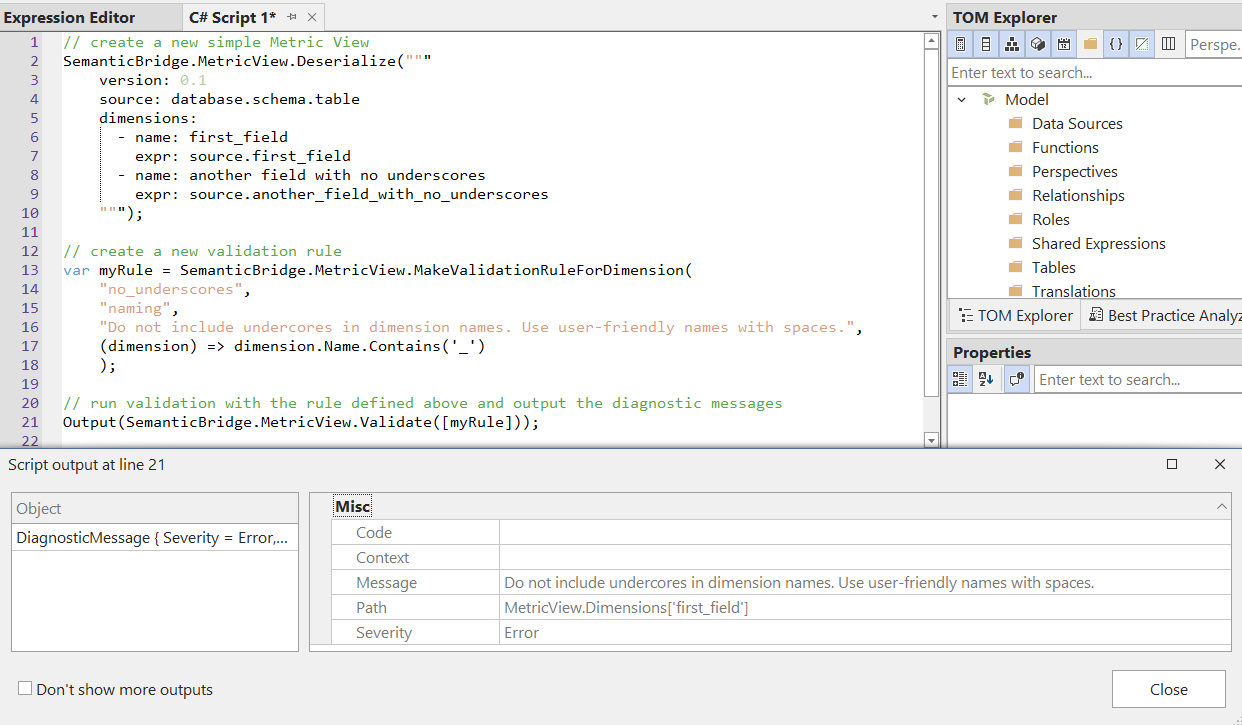
如果你希望对诊断信息有更多控制,并且让验证函数更灵活,可以使用上面提到的 MakeValidationRule 来创建上下文验证规则。
// necessary to use the Metric View object model
// aliasing to avoid conflicts with same-named TOM objects
using MetricView = TabularEditor.SemanticBridge.Platforms.Databricks.MetricView;

// create a new simple Metric View
SemanticBridge.MetricView.Deserialize("""
    version: 1.1
    source: database.schema.table
    fields:
      - name: customer
        expr: source.customer_id
      - name: repeat_customer
        expr: source.customer_id
    """);

// create a new validation rule
var myRule = SemanticBridge.MetricView.MakeValidationRule<MetricView.Field>(
    "no_aliased_fields",
    "modeling",
    (field, context) =>
    {
        var original = context.FieldNames.FirstOrDefault(seen => field.View.Fields[seen].Expr == field.Expr);
        return original == null
            ? []
            : [context.MakeError(
                "field_alias",
                $"Field '{field.Name}' reuses source expression '{field.Expr}', already used by field '{original}'.",
                field)];
    });

// run validation with the rule defined above and output the diagnostic messages
var sb = new System.Text.StringBuilder();
foreach (var d in SemanticBridge.MetricView.Validate([myRule]))
{
    sb.AppendLine($"[{d.Severity}] {d.Code} {d.Path}");
    sb.AppendLine($"    {d.Context} {d.Message}");
    sb.AppendLine();
}
Output(sb.ToString());
输出
[Error] field_alias Model.Fields["repeat_customer"]
     Field 'repeat_customer' reuses source expression 'source.customer_id', already used by field 'customer'.
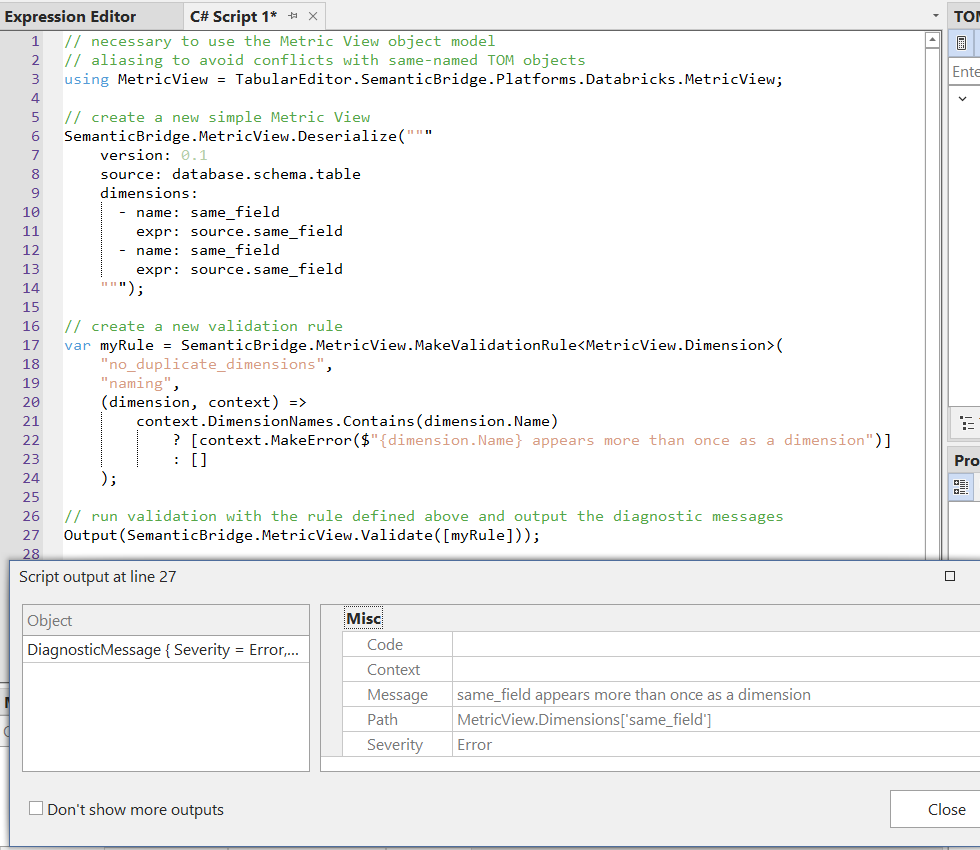
这个帮助方法要求你将对象类型作为类型参数传入,而验证函数现在是一个双参数函数,签名为 (metricViewObject, context)。第一个参数是要对其评估规则的 Metric View 对象。第二个参数是一个 IReadOnlyValidationContext。该上下文对象包含若干集合,用于保存已检查对象的名称;
这意味着我们可以用它只检查那些已通过验证的对象。上下文对象还提供了一些辅助方法,用于创建新的诊断信息;
这样一来,信息不必写成硬编码字符串,
而是可以包含你正在检查的对象的属性。这里我们使用 MakeError,上下文对象中也包含 MakeWarning。你可以在这个示例中看到,我们在信息中同时包含了违规字段,以及它所别名指向的字段。
验证规则最佳实践
建议创建更多简单规则,而不是更少但更复杂的规则。验证过程非常轻量,即使规则很多,也无需担心性能问题。例如,如果你想确保 Metric View 字段名称不是 camelCased、不是 kebab-cased,也不是 snake_cased,最好分别创建三条规则,而不是试图在一条规则中同时检查这些条件。这样每条规则都能保持简单,信息也会更具体,因此更容易采取相应措施。
一般来说,一旦某条规则能够捕获某个特定问题,最好就保持不变,而不是继续编辑它。如果你发现该规则遗漏了你想捕获的某个条件,只需新增一条小而简单的规则来覆盖这个新条件即可。
你可以在一个 C# Script 中保存许多不同的规则,以便在不同的 Metric View 之间复用。由于已加载的 Metric View 可在多个脚本中访问,你可以保存仅用于定义规则的 C# Script,然后调用 SemanticBridge.MetricView.Validate,从而轻松复用这些验证脚本。请看下图:左侧的脚本“deserialize-mv.csx”已经运行,用于将一个 Metric View 加载到 Tabular Editor 中。然后,再运行右侧的第二个脚本“run-rules.csx”来执行验证。第二个脚本可以长期保留,供你所有的指标视图复用。
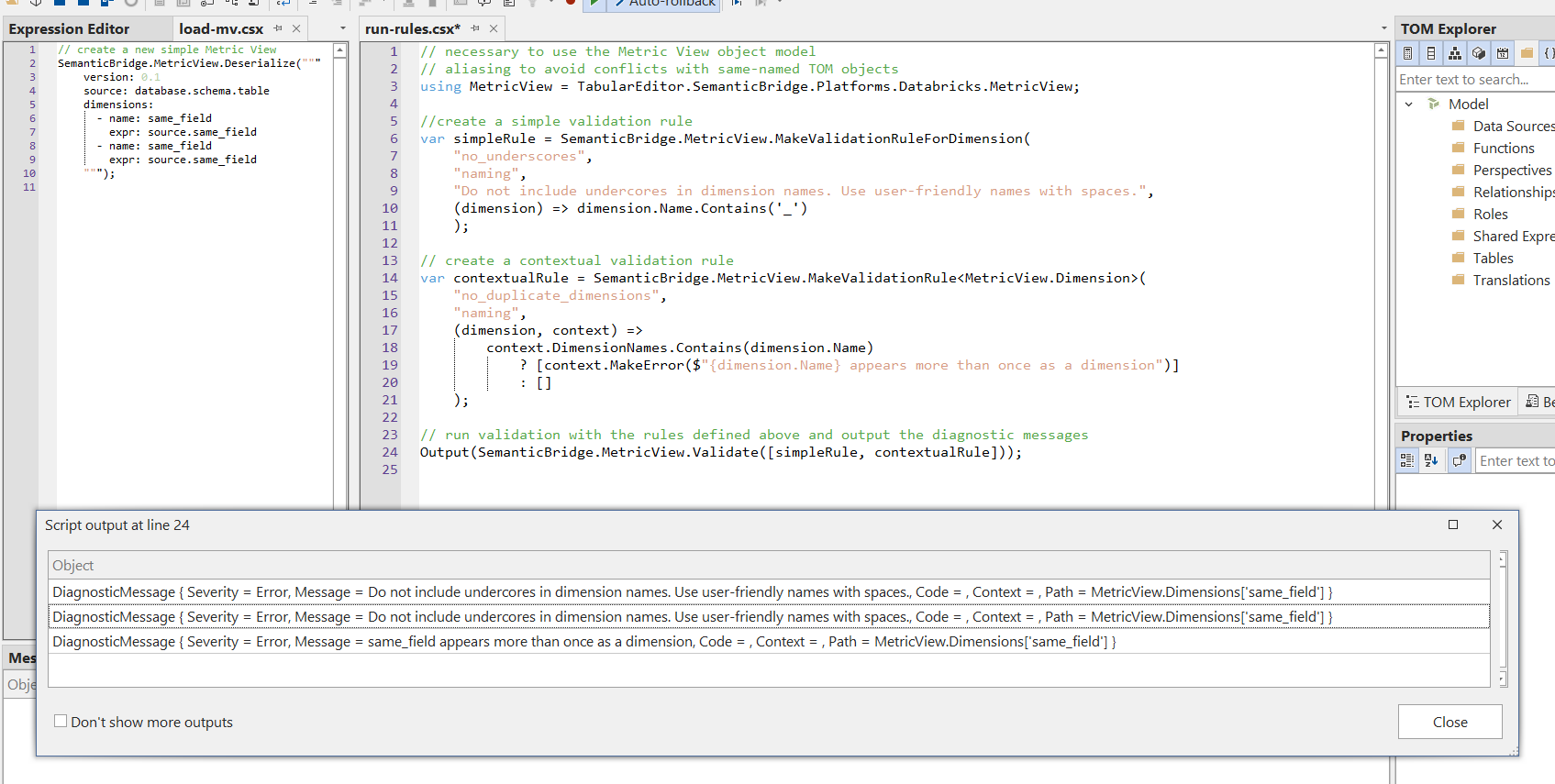
为方便起见,下面把这些脚本贴出来;它们只是对上文脚本的重新排列。
"deserialize-mv.csx"
// create a new simple Metric View
SemanticBridge.MetricView.Deserialize("""
    version: 1.1
    source: database.schema.table
    fields:
      - name: customer
        expr: source.customer_id
      - name: repeat_customer
        expr: source.customer_id
    """);
"run-rules.csx"
// necessary to use the Metric View object model
// aliasing to avoid conflicts with same-named TOM objects
using MetricView = TabularEditor.SemanticBridge.Platforms.Databricks.MetricView;

//create a simple validation rule
var simpleRule = SemanticBridge.MetricView.MakeValidationRuleForField(
    "no_underscores",
    "naming",
    "Do not include underscores in field names. Use user-friendly names with spaces.",
    (field) => field.Name.Contains('_')
    );

// create a contextual validation rule
var contextualRule = SemanticBridge.MetricView.MakeValidationRule<MetricView.Field>(
    "no_aliased_fields",
    "modeling",
    (field, context) =>
    {
        var original = context.FieldNames.FirstOrDefault(seen => field.View.Fields[seen].Expr == field.Expr);
        return original == null
            ? []
            : [context.MakeError(
                "field_alias",
                $"Field '{field.Name}' reuses source expression '{field.Expr}', already used by field '{original}'.",
                field)];
    });

// run validation with the rules defined above and output the diagnostic messages
var sb = new System.Text.StringBuilder();
foreach (var d in SemanticBridge.MetricView.Validate([simpleRule, contextualRule]))
{
    sb.AppendLine($"[{d.Severity}] {d.Code} {d.Path}");
    sb.AppendLine($"    {d.Context} {d.Message}");
    sb.AppendLine();
}
Output(sb.ToString());
输出
[Error] no_underscores Model.Fields["repeat_customer"]
     Do not include underscores in field names. Use user-friendly names with spaces.

[Error] field_alias Model.Fields["repeat_customer"]
     Field 'repeat_customer' reuses source expression 'source.customer_id', already used by field 'customer'.